For a small US firm, start with Drake or TaxAct for predictable desktop costs, ProSeries for forms-based preparation, and ProConnect for browser access and QuickBooks Online. For a practice built around complex entities, multistate work or estate filings, put Lacerte and UltraTax CS on the shortlist. CCH Axcess Tax deserves a separate look when the wider Axcess platform is part of the decision.
The choice gets easier when you count the returns you actually prepare. Fifty individual returns, 200 mixed returns and a group of related partnerships and owners are three different buying problems. A cheap entry license can become expensive once you add returns, concurrent users and hosting.
Best professional tax software at a glance
| Product | Strong reason to shortlist it | Published price example | The buying distinction |
|---|---|---|---|
| Drake Tax | Predictable desktop pricing for individual and business work | Pro Unlimited: $2,695 single user / $3,145 multi-user | Hosting, portal and workflow products are separate |
| TaxAct Professional | A lower-priced unlimited desktop alternative | Complete: $2,095 single user / $2,495 multi-user | Match the supported forms to your specialty work |
| ProSeries | Preparers who work comfortably on tax forms | Basic 20: $729; Essentials 200: $3,641 | Basic is for individuals; Essentials 200 counts mixed returns and needs an add-on for simultaneous users |
| ProConnect | Browser preparation and a QuickBooks Online client base | Essentials 50: $2,478 | The bundle includes 50 individual returns and one paid user; business returns cost extra |
| Lacerte | Input-based preparation with broader specialist form coverage | $599 pay-per-return license, plus return charges | The entry license is not an unlimited-return package |
| UltraTax CS | Related entities, state allocation and a CS-based firm | Custom quote | Modules, jurisdictions, users and hosting determine the configuration |
| CCH Axcess Tax | Firms evaluating an integrated Axcess tax environment | Package or custom quote | Separate Tax from the document, workflow and firm-management products |
Price snapshot: September 10, 2026, in USD. These are displayed purchase offers, not renewal commitments or equivalent bundles; taxes and optional services are excluded. Sources: Drake, TaxAct, ProSeries, ProConnect and Lacerte.
How we evaluated: official pricing, product and conversion documentation, plus the AICPA practitioner survey discussed below. Recommendations are our editorial assessment; we have not timed these products in a live firm. Tidyflow publishes this guide and sells software for the client work around tax preparation.
Missing documents, review queues and unpaid invoices also shape the cost of tax season. See how Tidyflow connects those steps to each tax job, alongside the preparation software you choose.
Keep your software comparison in one place
Take a printable scorecard into the demos and record the complete annual cost beside your workflow findings.
No spam. Unsubscribe anytime. See our privacy policy.
Check your inbox
We've sent the template to your email. If it doesn't arrive in a few minutes, check your spam folder or reply to support@tidyflow.com and we'll resend.
Want it as a live workflow instead?
Run it in Tidyflow and the steps become subtasks your team checks off, with the client requests sent straight to their portal.
Try the client workflow in Tidyflow14-day free trial. No credit card.
Drake Tax
Drake is a sensible starting point for a price-conscious firm with a broad, repeatable mix of individual and business returns. Its desktop tools include prior-year comparison through LookBack, review marking through DoubleCheck and pass-through K-1 export to individual returns. Those are useful preparation and review capabilities; calling it only a budget option misses part of the value. See Drake Tax’s feature overview.
The important buying choice is which Drake package, before whether to leave Drake. Pay-per-return can suit a very small practice, while an individual-only package may become poor value once business-return charges accumulate. Our Drake alternatives guide shows the package break-even calculation and separates price, browser access and complex-return reasons for switching.
Drake Tax Online is a distinct option. Its current documentation describes a Windows desktop mode and requires that mode for some entity returns in tax year 2025. That is not a confirmed limitation for every subsequent tax year, but it is enough reason to demonstrate your entity workflow on the actual computers you intend to use before choosing it for a Mac-only team.
TaxAct Professional
TaxAct belongs on the shortlist when the priority is reducing a desktop software bill without moving to per-return pricing. Its Complete bundle includes unlimited supported individual and business returns; the advertised multi-user package is $650 below Drake Pro Unlimited’s displayed multi-user price at this snapshot.
That difference is a starting point for evaluation, not proof of better value. If changing products creates even ten extra hours of work at an assumed $65 hourly staff cost, the first year’s license saving disappears. Test the business returns, state schedules and review steps that produce the most work in your practice. A successful trial should identify both supported forms and any inputs that need manual handling.
UltraTax CS
UltraTax is particularly worth evaluating when an entity return feeds several owner returns, or when multistate allocation is a regular part of the work. Its documented capabilities include business apportionment tools and working across up to four monitors. Thomson Reuters also documents sharing pass-through information with individual returns.
The practical test is a client group: change a partnership item, transfer the information to an owner’s return, and have the reviewer trace the change. A fast standalone 1040 demonstration will not establish whether UltraTax improves that process.
Pricing is configured for the firm. Keep hosted access and companion products such as document automation or return delivery separate in the quote. For the closest complex-return comparison, read Lacerte vs UltraTax CS.
Intuit ProConnect
ProConnect is the clearest fit in this shortlist for a team that wants to prepare in a browser and already keeps clients’ books in QuickBooks Online. The connection is concrete: Intuit’s Prep for Taxes workflow lets firms work with the trial balance and export accounting data to ProConnect.
Its economics depend on return mix. An individual-return bundle is not a pool of interchangeable individual and business credits. User licensing also depends on responsibilities: free Standard users can enter data, while printing and e-filing require paid access. Our ProSeries vs ProConnect comparison works through the package differences.
ProConnect supports mainstream entity work as well as individual returns. The more useful boundary is specialist coverage: Intuit’s product comparison lists Forms 706 and 5500 for Lacerte, but not ProConnect. An estate-tax practice should resolve that before comparing convenience or price. See Lacerte vs ProConnect for the detailed decision.
Intuit Lacerte
Lacerte is an input-based desktop product with optional hosted access. It merits a serious trial when specialist filings and reviewer familiarity are worth more to the firm than a low entry price. Its broader module coverage makes it a different proposition from simply putting an ordinary individual-return workload into another Intuit product.
Watch the pay-per-return arithmetic. The current Lacerte checkout lists $105 for an individual return with one state, and $148 for the listed core business or fiduciary returns with one state, on top of the license. A firm preparing substantial volume should compare a package quote rather than extrapolate that entry offer as the only way to buy Lacerte.
For an established Lacerte team, a switch has to repay conversion checks and retraining. If the return itself moves efficiently but work sits waiting for documents, a new preparation engine may leave the main delay untouched.
Intuit ProSeries
ProSeries is the forms-based choice within Intuit’s range. Its familiar return screens, QuickZoom drill-down and HomeBase client list can suit a team that prefers to navigate from the form being reviewed. Those workflow details matter more than describing it vaguely as software for smaller firms.
The edition changes what you are buying. Basic packages serve individual returns with state and volume limits. Professional Essentials 200 allows a mix of 200 supported individual and business returns and includes state returns, but its product page explicitly requires a separate Network License for simultaneous users.
A firm with 150 individual and 50 business returns should compare that mixed pool with a ProConnect quote containing both return types. Comparing two headline “200 return” prices would give the wrong answer.
CCH Axcess Tax
CCH Axcess Tax is worth evaluating when the decision includes the surrounding Axcess environment and how the firm shares client information across it. Wolters Kluwer also offers Tax Essentials for smaller firms, so “enterprise only” is too narrow a description.
Keep the delivery model precise. Cloud storage and services do not necessarily mean browser-only preparation: Wolters Kluwer’s preparer guide documents installed Axcess applications. Check the current workstation requirements against your remote-access plan.
If your firm is already in Axcess, identify whether the problem is tax preparation, return routing, document management or billing. Our CCH Axcess alternatives guide separates those replacement decisions.
What the practitioner survey adds
The 2026 AICPA tax software survey collected responses from 1,808 members. Drake and Lacerte tied for the highest overall rating at 4.4 out of 5. UltraTax had the highest share saying it contained all the forms they needed, at 92.1%. Price was a frequent complaint among Lacerte and UltraTax users.
These are reports from different customer groups, not controlled speed or accuracy tests. They support taking value and coverage seriously; they do not establish that one product will be fastest for your firm.
ProConnect vs UltraTax CS or CCH Axcess Tax
For ProConnect vs UltraTax, follow one client’s data. A QBO bookkeeping client moving into a business return gives ProConnect a relevant advantage to demonstrate. A partnership linked to several owner returns with state allocations gives UltraTax a different, equally relevant test. Compare how many mappings, transfers and reviewer checks your team must maintain.
For ProConnect vs CCH Axcess, first decide whether you need a browser preparation tool or a wider connected firm platform. Compare the actual tax package, document system and delivery process in the proposed configuration. A platform’s product catalogue is not the same thing as the modules included in its price.
Build the decision around three numbers
- Cost for your return mix. Count individual, business, fiduciary and specialist returns separately. Add state charges, paid roles, concurrent access, hosting and the services you will actually use.
- Minutes saved across preparation and review. Use the same cases in both products. Record manual re-entry, unresolved diagnostics and reviewer time, not just how quickly the first draft appears.
- First-year switching effort. Include conversion exceptions, carryover checks, staff training and access to historical files.
An illustrative $6,000 annual premium across 900 returns needs to save about 5.3 minutes per return at a $75 hourly staff cost to cover itself. That is a target to measure, not a claim about any vendor. First-year migration work raises the target.
Conversion deserves its own check. For example, Intuit’s ProConnect conversion guide explicitly excludes state information. A vendor accepting your files does not mean every historical return, attachment and carryover has moved intact.
Get the documents in, the work reviewed and the invoice paid
Choosing a tax engine settles how you prepare returns. Your firm still needs a dependable way to collect the information, assign the work and finish the client handoff. Tidyflow connects those steps to the tax job, so your team can see what is missing and who needs to act.
Make payment part of delivering the work
Agree the scope and fee through proposals and engagement letters, then invoice fixed-fee work or tracked time. On Pro, you can link an invoice to a document approval and require payment before the client opens the attached document, with online payments connected. The invoice and approval live in the same client process, giving the team a concrete next step when work is finished but the fee is outstanding.
Get the organizer and documents back together
Start with a ready-made 1040, 1120-S, 1065, 1120 or 1041 organizer attached to its matching job template. Clients answer in sections, save progress and upload documents beside the relevant questions. If a K-1 has not arrived, they can mark it “I’ll send this later” and finish the rest; the deferred item remains visible and appears in reminders.
Returning clients can reuse answers from their previous completed Tidyflow organizer. Pro adds configurable conditional questions. Completed organizers export to PDF for your workpapers. The benefit is a defined collection process your team can repeat across clients, with less follow-up to assemble from separate emails.
Give each return an owner and a next step
Assign preparation and review, track internal and extended due dates, and repeat the job next year. Staff can check the job and its requests before interrupting the owner for an update. Pro adds service-specific statuses and capacity planning to help you see where work is accumulating. Tidyflow Agent can check outstanding request items and draft follow-up for your review.
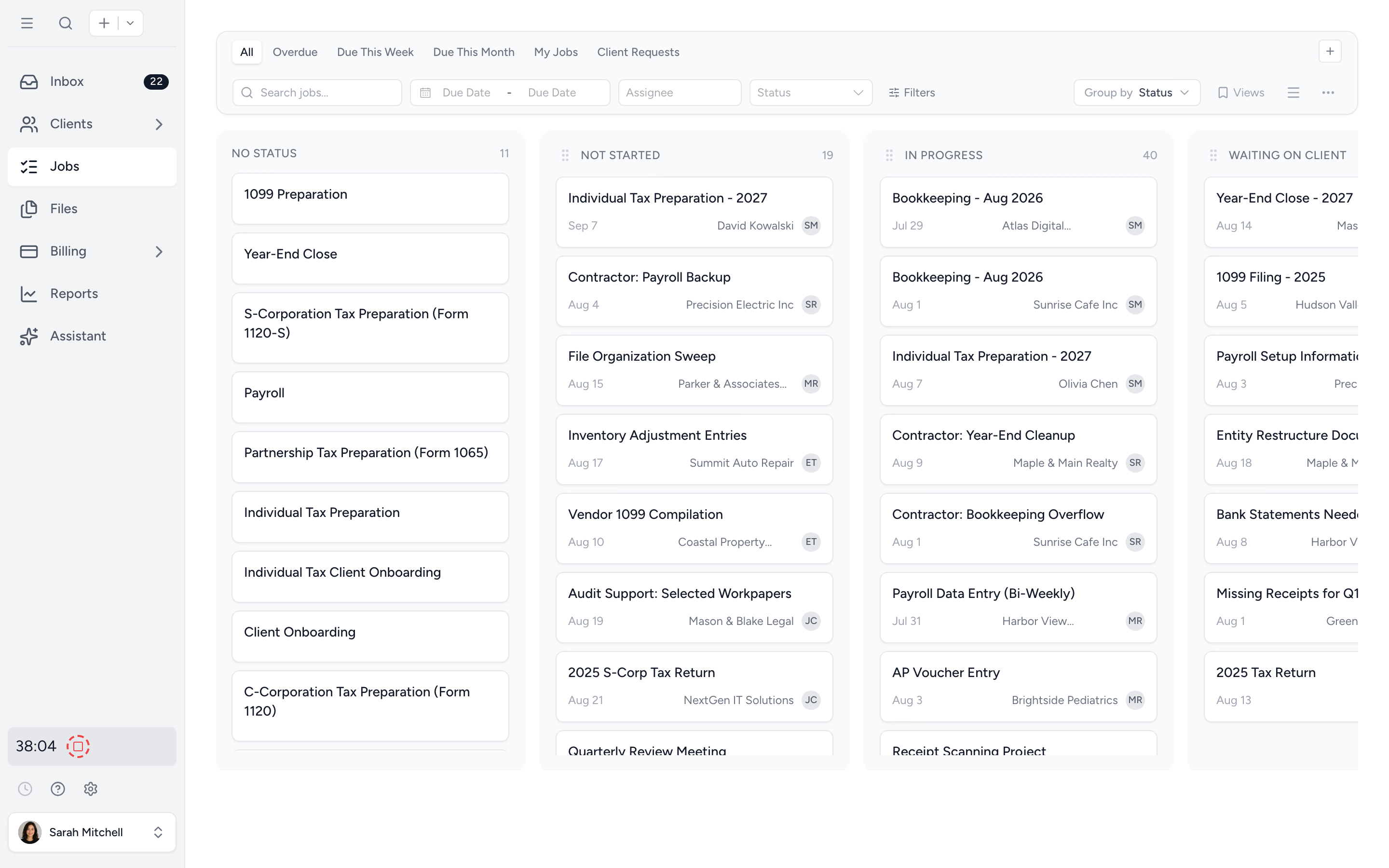
Intuit and Drake have intake, signing and workflow options of their own. Compare the process your team will actually use. Preparation and e-filing stay in your tax engine; Tidyflow does not automatically sync its return data. Pro document approvals and signature items are separate actions, and Tidyflow does not provide KBA for tax authorizations.
Try one complete tax job first. Choose a client, send the organizer, assign preparation and review, and follow the job through the client handoff. Then decide whether to roll that process out across the firm. Compare plan inclusions and per-user pricing; client portal users are not paid staff seats.
Try Tidyflow
Run your next tax job in Tidyflow.
Start with one client and a ready-made organizer. Free for 14 days, with no credit card required.
Continue with the comparison that matches your decision
- Drake Tax alternatives: decide whether to change package, move online or replace the engine.
- Lacerte vs ProConnect: weigh specialist coverage, browser access and conversion limits.
- ProSeries vs ProConnect: compare individual and mixed-return economics.
- Lacerte vs UltraTax CS: evaluate connected entities and complex-return review.
For the systems around preparation, see our accounting firm tech stack guide.