
Run your firm's work, without the spreadsheet sprawl.
Tidyflow keeps tax, bookkeeping, and compliance work moving, with templates, repeating jobs, and capacity planning built for the rhythm of an accounting firm.
Hit every deadline
Repeating jobs auto-create on the right cadence. Tax due dates, monthly closes, payroll runs. Nothing falls off.
Standardise the work
Build a tax-return template once. Bulk-deploy it to every client in seconds. Subtasks, owners, due-date offsets baked in.
See the firm at a glance
Partners get status, owners, and capacity in one live view. No more "hey, where are we on the Smith return?"
240 returns due in 12 weeks. One template. One afternoon to set up.
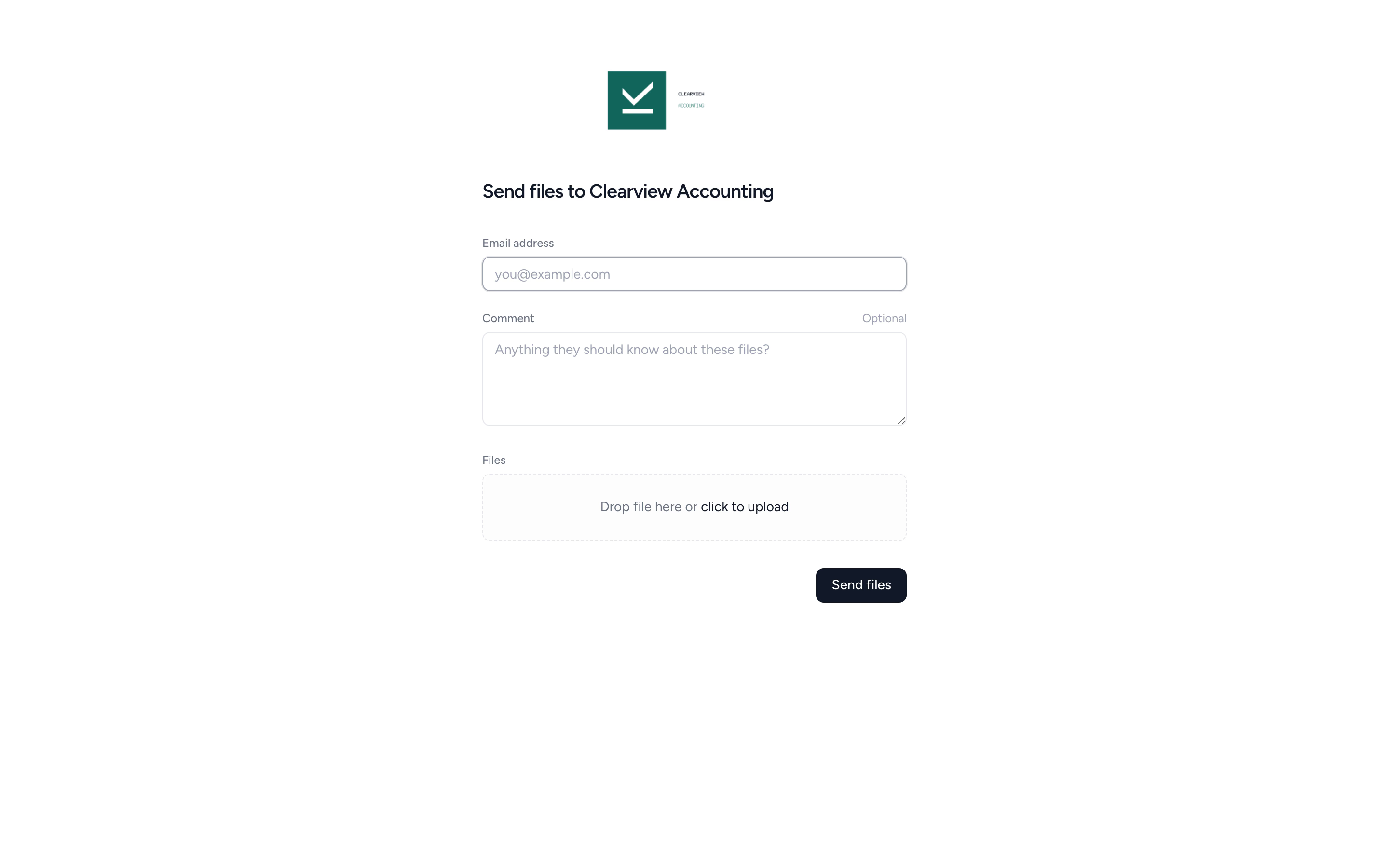
Build your tax-return workflow once (Awaiting info, In prep, Senior review, Partner sign-off, Filed), then bulk-deploy it to every client tagged "Tax". Tidyflow creates the jobs, sets due dates, assigns owners, and starts the clock. You spend the rest of the season clearing the queue, not building it.
- ✓ Bulk-deploy to all clients with a single tag
- ✓ Subtasks for every step, with per-subtask owners
- ✓ Due-date offsets so each job dates itself correctly
- ✓ Filter the job list by partner, status, or client
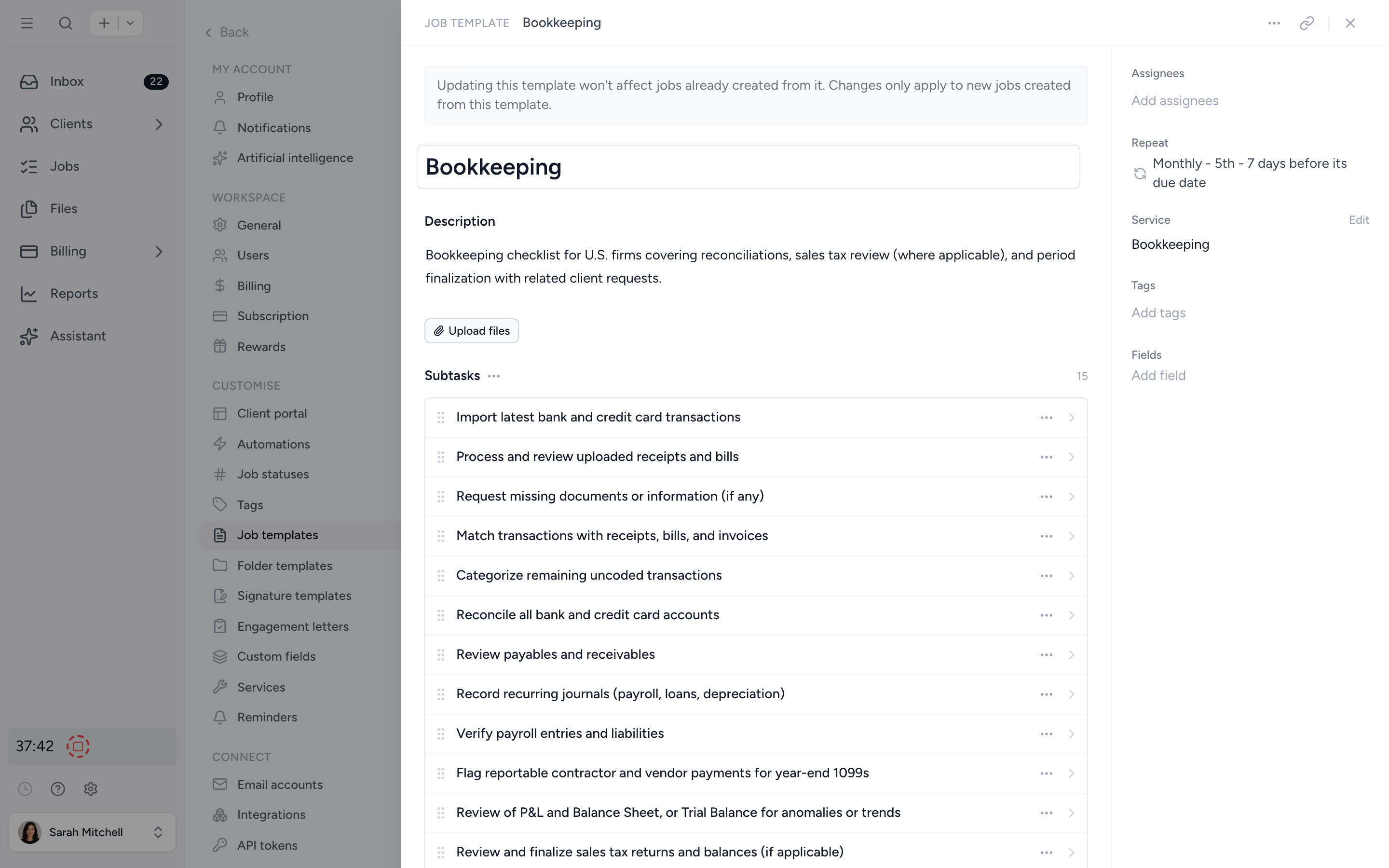
Same checklist. Every client. Every month. Without a single reminder.
Set monthly bookkeeping to repeat on the 1st and Tidyflow creates the next month's job the moment this month's is closed out. Bank rec, transaction review, payroll review, management report. Each subtask owned, each step tracked, each client visible.
- ✓ Daily, weekly, monthly, quarterly, annual, or custom cadence
- ✓ Owners and due dates carry forward automatically
- ✓ Bookmark "This month's close" as a one-click filter
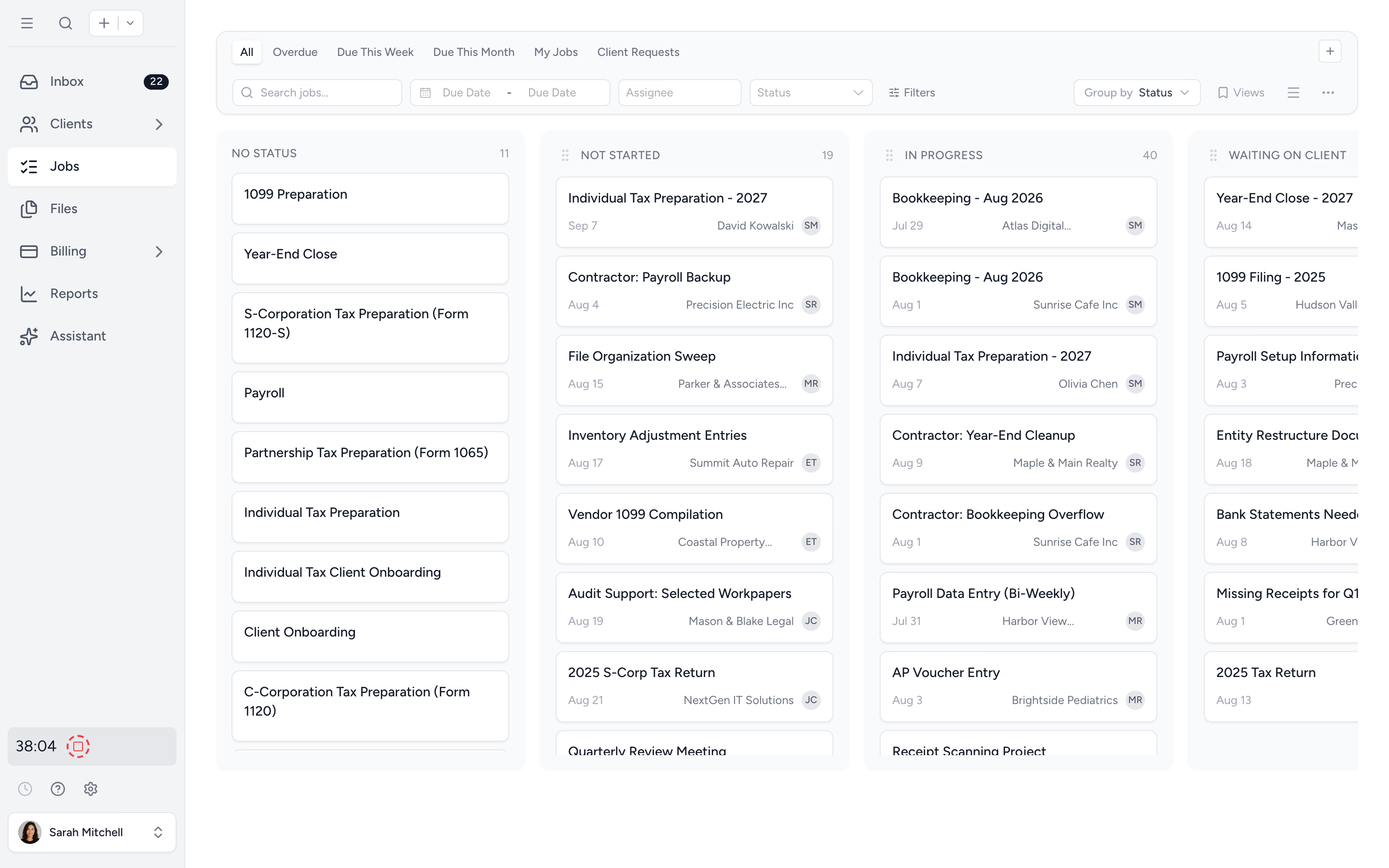
Stop chasing for documents. Let Tidyflow chase for you.
Send a request from inside the job, set the reminder cadence, and walk away. Clients upload via a secure link. No login, no email back-and-forth. When the file lands, the job moves forward on its own.
- ✓ Secure upload links, no client account needed
- ✓ Auto-reminders on the schedule you choose
- ✓ Files land directly in the job, not a shared inbox
Set the rules. Let Tidyflow do the housekeeping.
Build When-Then automations for the routine moves. When a due date passes, change the status. When a date's approaching, add a tag. When a VIP tag gets attached, assign the partner. Optional "Only If" conditions keep each rule precise. Quick templates get you going fast.
- ✓ Triggers when a date passes, approaches, or a tag is added
- ✓ Date triggers on start, due, internal due, or extended due
- ✓ Actions to set status, add or remove tags, or assign a user
- ✓ Optional "Only If" conditions per rule
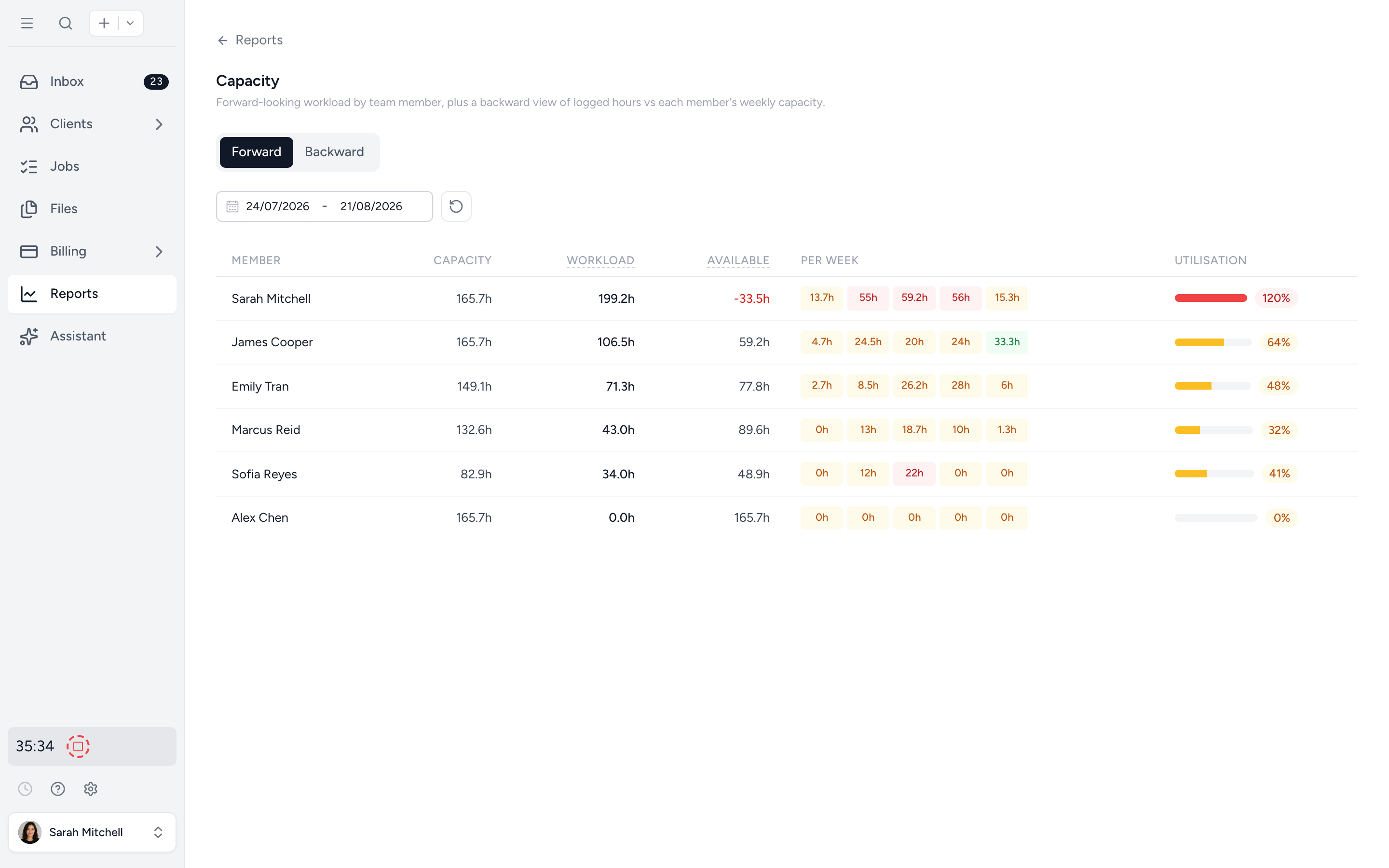
Know who has bandwidth before you commit a deadline.
See team capacity by week and by job type. Spot the bottleneck three weeks out and reassign before it becomes a fire. Drill into any team member to see exactly what's on their plate.
- ✓ Forward and backward capacity views
- ✓ Per-team-member drill-down
- ✓ Plan with estimated hours, not gut feel
Every detail in one place. Every step assignable.
A job in Tidyflow is more than a row in a list. Owners, due dates, files, comments, status, and subtasks all live together. Open it, work it, close it.
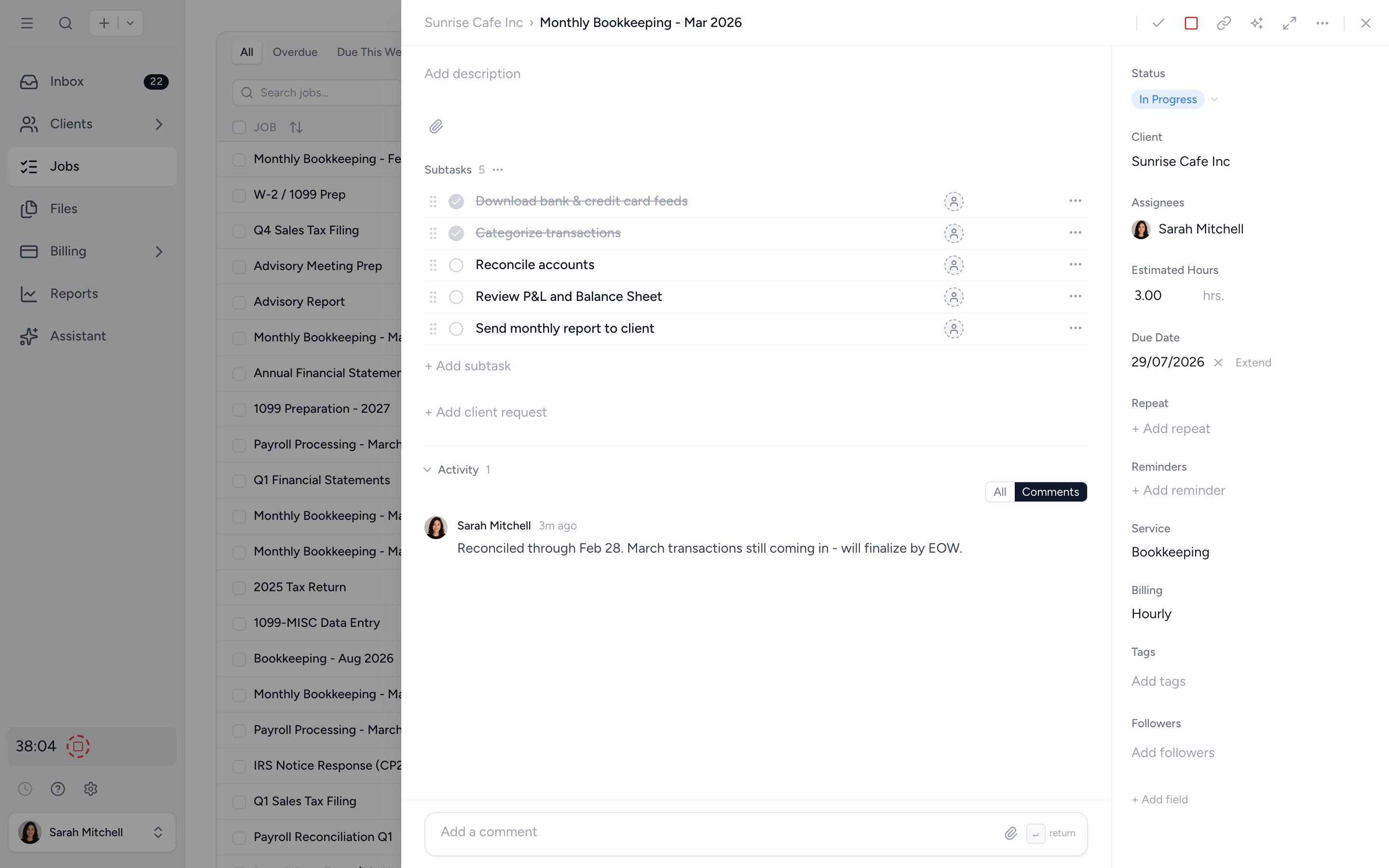
One screen for the whole job
Client, owners, due date, files, status, and activity. No clicking through tabs to find what's going on.
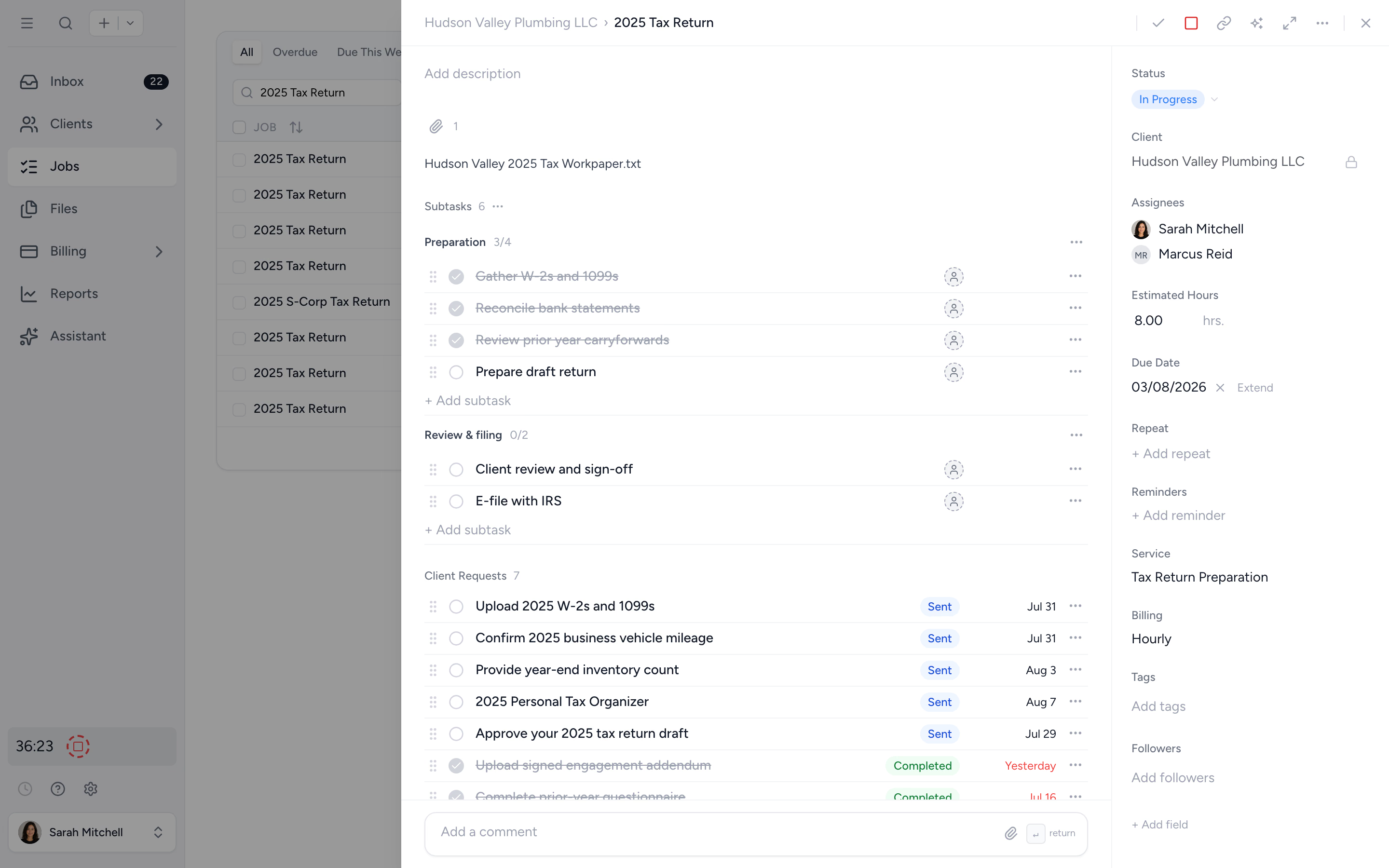
Break the work down
Subtasks with owners, due dates, dependencies, and custom statuses, grouped under section headings like preparation, review, and filing. Sections carry through templates, duplicates, and every repeat, and completing a job can complete its open subtasks in one go.
From spreadsheet sprawl to a clean queue in four steps.
- 1
Build (or import) a template
Start from a tax, bookkeeping, or onboarding starter. Or build your own with subtasks, owners, and due-date offsets.
- 2
Bulk-deploy to clients
Select clients by tag and Tidyflow creates the jobs in seconds. Each job dates itself correctly.
- 3
Track in the job list
Filter by owner, status, or client. Bookmark filters as one-click views.
- 4
Auto-repeat next cycle
The next instance creates itself when this one closes. Daily, monthly, annually, or on your schedule.
What changes when your workflow runs itself.
Without Tidyflow
- ×Spreadsheets that nobody updates after week two
- ×Rebuilding the same checklist for every job
- ×Email chains chasing clients for documents
- ×Partner asks "where are we on the Smith return?"
- ×Capacity guessed at, then over-committed
With Tidyflow
- ✓Live status everyone on the team can see
- ✓One template, bulk-deployed in seconds
- ✓Automated reminders + secure upload links
- ✓Partner dashboard answers itself
- ✓Capacity reports week-by-week, person-by-person
Trusted by accounting firms managing thousands of jobs.
10,000+ clients managed on Tidyflow today.
"The user-friendly interface and solid features have become essential in streamlining our accounting firm's operations, ensuring consistent and reliable service delivery."
 Andre CoutinhoAccounting Manager
 "Great for team collaboration, accountability, keeping track of information and ensuring nothing falls through the cracks."
 Kristine IsmaelPartner

Built for the way firms actually work.
Plan
- Job & task templates
- Repeating cadences
- Automation rules
- Bulk-deploy to clients
- Capacity planning reports
- Estimated hours
Do
- Subtasks with owners
- Subtask dependencies
- Multiple assignees
- Comments & @mentions
- Jobs on mobile (beta)
- Client requests + reminders
- Secure file uploads
Track
- Custom statuses
- Tags & filters
- List & board views
- Bookmarked views
- Audit trail
- Excel export
From $29/user/month, billed annually.
No minimum users. No setup fees. Unlimited clients on the portal at no extra cost. Cancel anytime.
Workflow management questions firms ask us most.
Repeating jobs auto-create on the cadence you set: daily, weekly, monthly, quarterly, annually, or a custom schedule. The next instance is created when the current one is marked complete, so your job list never gets cluttered with future work.
Yes. Pick a template, select the clients (or all clients with a tag), and Tidyflow creates the jobs in seconds. This is how most firms set up their tax season or monthly bookkeeping in one sitting.
Yes. Assign multiple owners at the job level, plus different owners per subtask. Use @mentions in comments to notify a teammate without sending an email.
Yes. Build custom tracking statuses to match how your firm works, e.g. Awaiting info → In progress → Partner review → Filed.
Yes. Tidyflow ships with template starters for tax returns, bookkeeping, payroll, and onboarding. Edit them, save them, and bulk-deploy.
Overdue jobs are flagged in the job list and on the dashboard. You can filter by overdue, by owner, or by client to triage in seconds. Bookmark the filter and you have a one-click overdue queue.
Get your firm's work running on rails.
Start free for 14 days. No credit card. Set up your first workflow in minutes.
Explore more features
Client management
Every client, contact, and detail in one organized place.
Proposals & Engagement Letters
Branded proposals and engagement letters, signed online.
Billing & Payments
Invoice from tracked time or fixed fees, and get paid online.
Time tracking
Timers and timesheets that flow straight into billing.
Document management
Secure, organized document storage, shared with your clients.
Client portal & requests
Clients upload, answer, and approve in one portal. Reminders chase for you.
Tax organizers
Digital organizers with conditional questions and last year's answers.
Email Management
A shared firm inbox, connected to your clients and jobs.
Artificial Intelligence
An assistant, agent teammates, and MCP connectors on your firm's live data.
Reporting & Insights
See where your time, billing, and revenue actually go.
Capacity Planning
See your team's workload before it hits.
Integrations
Xero, QuickBooks Online, Zapier, Make, and a public API.
Electronic signatures
Legally binding e-signatures, included at no extra cost.
Collaboration
Comments, mentions, and shared visibility on every job.
See the full feature list →
Compare every capability across plans, side by side.