
Client documents that file themselves.
Every client gets a folder. Every team member has access. Smart Classification reads what your clients upload and names the chaos for you. Stop renaming scan_0412.pdf.
Stop renaming scan_0412.pdf
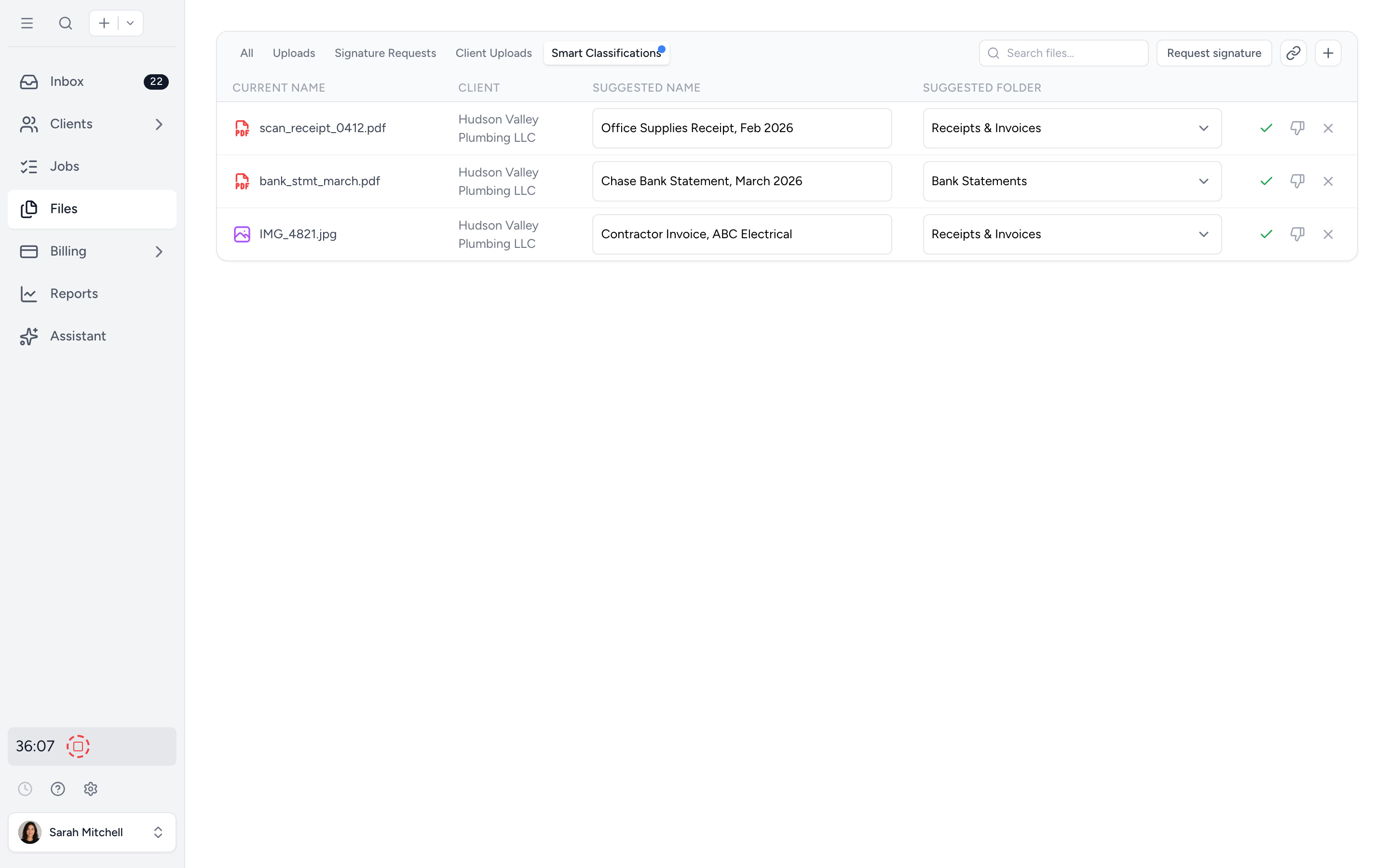
Smart Classification reads receipts, bank statements, contractor invoices. Suggests the right name and folder. You approve.
Send a link, not an email
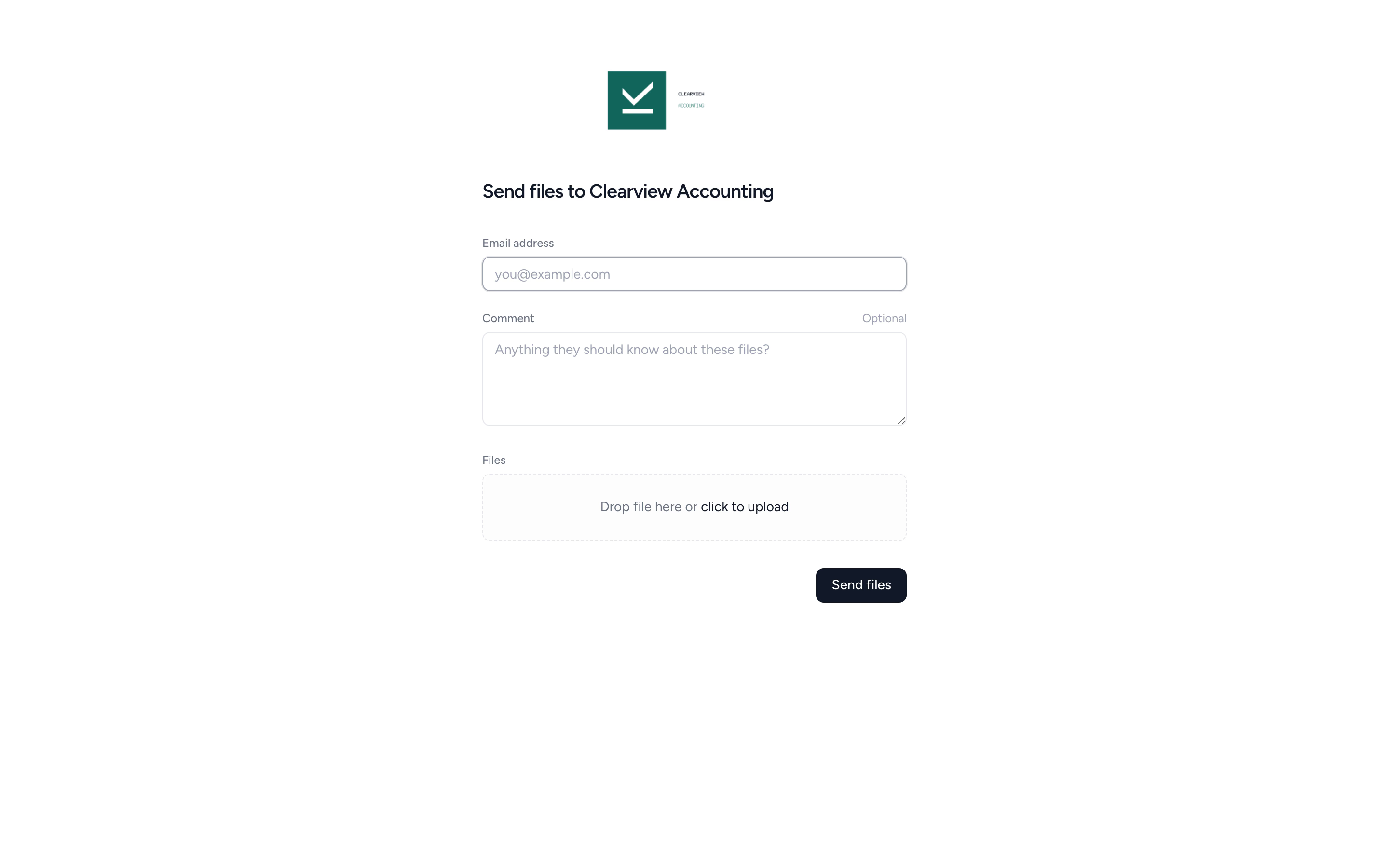
Each client gets a secure upload link. No login. No email back-and-forth. Files land in the right folder automatically.
Find any file in seconds
Search across every client, every folder. Preview without downloading. Audit trail on every upload, view, and edit.
Watch Tidyflow turn document chaos into one-click filing.
A short walkthrough of how Smart Classification, no-login uploads, and folder templates fit together.
Stop renaming scan_0412.pdf.
Clients upload IMG_4821.jpg. Tidyflow reads it, recognizes it as a contractor invoice, suggests a clean name (Contractor Invoice — ABC Electrical), and queues it for the right folder. You review the queue and approve. Hours of admin, gone.
- ✓ AI reads receipts, statements, invoices, and forms
- ✓ Suggests a name in your firm's convention
- ✓ Suggests the right client folder
- ✓ Always one-click human approval before anything renames
Your client doesn't need an account.
Send a secure upload link, your client drops files in, done. No password, no portal tour, no abandoned signup.
- ✓ A firm-wide link for ad-hoc uploads, or a per-client link that routes to the right folder
- ✓ Drag-and-drop with optional comment
- ✓ Audit-trailed: who uploaded, when, from where
Every client. One folder. Everyone on the team has access.
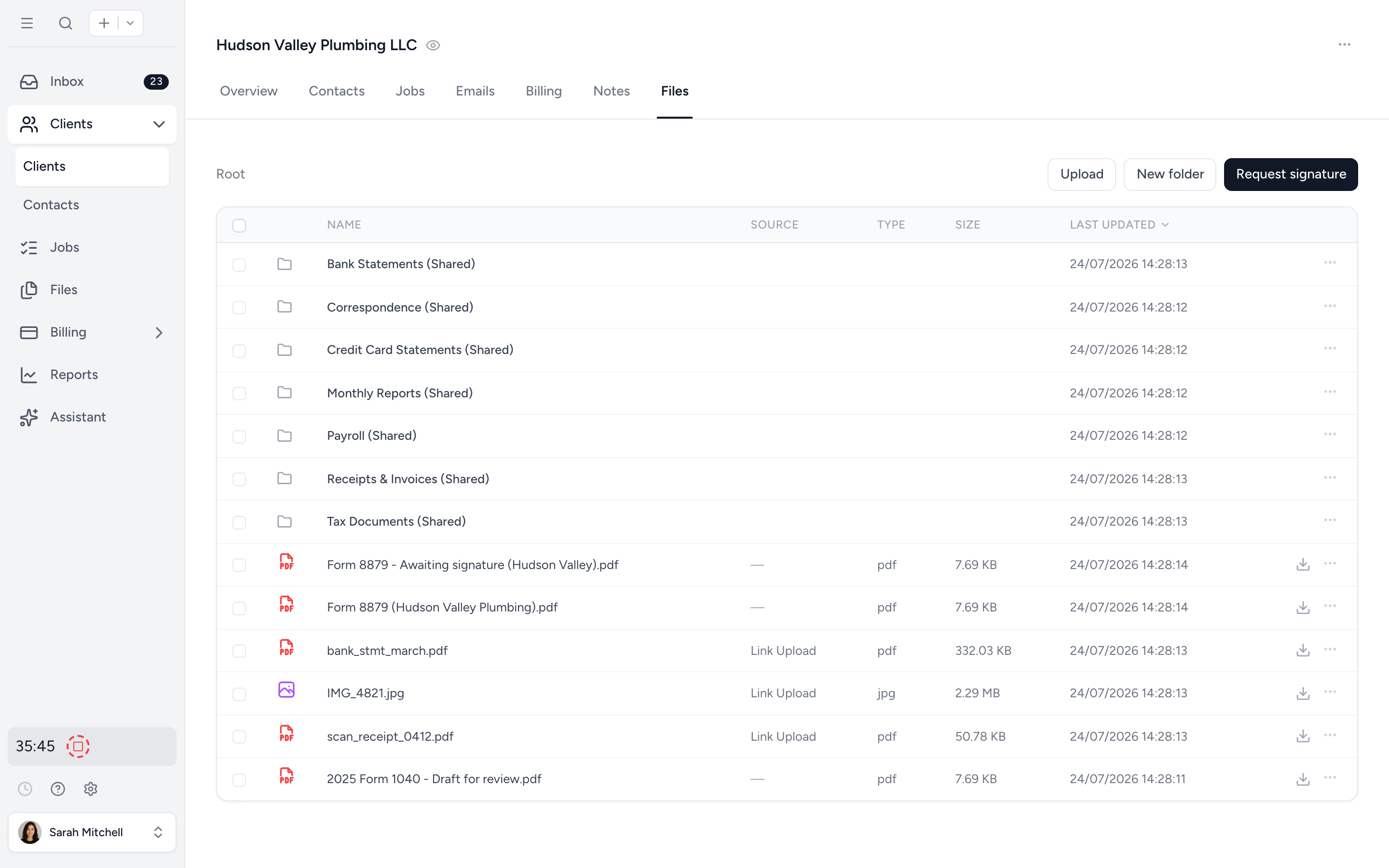
No more "where did we save the 2024 BAS?" Every client has a folder structure that works the way your firm works. The whole team has access. Clients see only what you share with them. Audit trail on everything.
- ✓ Per-client folder, mirrored on the portal
- ✓ Share folders with specific contacts only
- ✓ Quick previews without downloading
- ✓ Bulk ZIP download for archives
Set up 200 clients with the same folder structure in seconds.
Define your firm's folder structure once. Bulk-deploy it across selected clients in one action. Onboarding a new client takes seconds, not 20 minutes of clicking through New Folder dialogs.
- ✓ Reusable folder templates
- ✓ Bulk-apply to selected clients
- ✓ Consistent structure across the whole firm
From scan_0412.pdf to filed in seconds.
- 1
Set folder templates
Define your firm's folder structure once. Bulk-apply to selected clients.
- 2
Send the upload link
Clients drag and drop into their secure link. No login.
- 3
Smart Classification queues a name
Tidyflow reads each file and suggests the right name and folder.
- 4
Approve and move on
You review the queue and one-click approve. Audit trail captures the rest.
What changes when documents stop being homework.
Without Tidyflow
- ×Email attachments scattered across inboxes
- ×"scan_0412.pdf" in a Downloads folder, somewhere
- ×"Where did you save the 2024 BAS?"
- ×Clients ghost the portal because they forgot the password
- ×No record of who saw what, when
With Tidyflow
- ✓Per-client folder, accessible to the whole team
- ✓Smart Classification names files for you
- ✓Search across every client, instantly
- ✓No-login upload links, drag-drop, done
- ✓Full audit trail on every file
Trusted by accounting firms drowning in client documents.
10,000+ clients managed on Tidyflow today.
"The user-friendly interface and solid features have become essential in streamlining our accounting firm's operations, ensuring consistent and reliable service delivery."
 Andre CoutinhoAccounting Manager
 "Great for team collaboration, accountability, keeping track of information and ensuring nothing falls through the cracks."
 Kristine IsmaelPartner

Built for the way firms actually share files.
Store
- Per-client folders
- Folder templates
- Bulk template deploy
- Unlimited storage
- Quick file previews
Share
- No-login upload links
- Per-folder client access
- Bulk ZIP download
- Branded client portal
- Move & rename in bulk
Govern
- Smart Classification (AI)
- Audit trail per file
- Encrypted backups
- Multi-factor authentication
Unlimited storage. From $29/user/month, billed annually.
No per-GB fees. No file count limits. Unlimited clients on the portal at no extra cost.
Document management questions firms ask us most.
Tidyflow reads the contents of receipts, bank statements, contractor invoices, and other common documents your clients upload, and uses your existing folder structure to suggest where each file belongs and what to call it. You always review the queue before anything is renamed.
Yes. Two options: a firm-wide upload link you can paste into your email signature or website, and a per-client link that routes files directly to the right client folder. Both are drag-and-drop with an optional comment. No account required.
No. Storage is unlimited on every plan with no extra cost per file or per GB. Upload PDFs, images, spreadsheets, signed documents, anything your firm holds for a client.
There is no retention period. Files stay for as long as your account is active and nothing is deleted automatically after a set time, so a client's prior-year documents are still there when you need them next season. You decide what to clean out and when.
Tidyflow is hosted on AWS and DigitalOcean infrastructure in U.S. data centres. Both providers are independently audited and maintain SOC 2 certifications. We add encrypted backups, multi-factor authentication, and regular vulnerability scans on top. Read our security page for the full detail.
Yes. Select multiple files or an entire folder and download as a single ZIP. Useful for archives, audit-trail packages, and end-of-year backups.
Yes. Trigger a full firm-wide export and Tidyflow packages every client's files into a single ZIP for you to download. Use it for offline backups, audits, or to take your data with you. No lock-in.
Yes. PDFs, images, and common document formats preview directly in Tidyflow. No need to download every receipt to check it.
Get to inbox zero, but for files.
Start free for 14 days. No credit card. Unlimited storage on every plan.
Explore more features
Workflow management
Recurring jobs, templates, and deadlines your team can't miss.
Client management
Every client, contact, and detail in one organized place.
Proposals & Engagement Letters
Branded proposals and engagement letters, signed online.
Billing & Payments
Invoice from tracked time or fixed fees, and get paid online.
Time tracking
Timers and timesheets that flow straight into billing.
Client portal & requests
Clients upload, answer, and approve in one portal. Reminders chase for you.
Tax organizers
Digital organizers with conditional questions and last year's answers.
Email Management
A shared firm inbox, connected to your clients and jobs.
Artificial Intelligence
An assistant, agent teammates, and MCP connectors on your firm's live data.
Reporting & Insights
See where your time, billing, and revenue actually go.
Capacity Planning
See your team's workload before it hits.
Integrations
Xero, QuickBooks Online, Zapier, Make, and a public API.
Electronic signatures
Legally binding e-signatures, included at no extra cost.
Collaboration
Comments, mentions, and shared visibility on every job.
See the full feature list →
Compare every capability across plans, side by side.