Shortlist UltraTax CS when the hard part of your work is managing related entities, owner returns and multistate allocations. Shortlist or keep Lacerte when its input and review process already handles your specialist work efficiently. Both deserve consideration for complex returns; firm size alone is a poor way to choose between them.
The useful comparison is a group of clients whose returns affect one another. Follow a partnership adjustment through the owners’ returns and the review process. Then measure the manual work left over in each product.
Lacerte vs UltraTax CS at a glance
| Decision | Lacerte | UltraTax CS |
|---|---|---|
| Preparation environment | Windows desktop; optional hosting | Windows application; local, network or supported hosted setup |
| Related returns | Documented K-1 export and import | Documented data-sharing workflows across return types |
| Review focus for a trial | Trace outputs to inputs and inspect import exceptions | Review connected returns, allocation inputs and changes across monitors |
| State-work trial | Reproduce your actual allocation and adjustment process | Test allocation spreadsheets and business apportionment tools |
| Published price approach | Pay-per-return entry offer; volume packages quoted | Configured quote |
| Best reason to switch | A specific coverage or review improvement | Less work maintaining the related-client and multistate workflow |
Sources: Lacerte, UltraTax CS, UltraTax installation guidance and the workflow documentation linked below. Checked September 10, 2026. We have researched the products rather than timed them in a live practice. Tidyflow publishes this guide and provides software for the client work surrounding tax preparation.
A faster calculation helps only once the work reaches the right person. If returns are waiting for documents or review, see how Tidyflow makes the surrounding workload and handoffs visible.
Both belong in a complex-return shortlist
Lacerte’s published lineup includes specialist modules such as Forms 706 and 5500 as well as common individual and entity returns. UltraTax also offers broad federal, state and local preparation. A blanket distinction between “Lacerte for small firms” and “UltraTax for large firms” conceals the actual work that determines fit.
One five-person practice may prepare complex partnerships and related owner returns all year. Another may prepare a much larger number of relatively consistent individual returns. Their review and transfer needs will differ even if both products support their main federal forms.
Create the coverage list from last season’s difficult cases. Include the specific state and local filings, entity relationships and overrides involved. Treat a supported form and an efficient workflow for that form as two separate findings.
K-1 transfers: both products have a workflow to test
Lacerte supports exporting a completed Schedule K-1 into the recipient’s return. Intuit’s K-1 transfer instructions identify practical conditions: recipient names and tax identifiers must match, and modules must use the same K-1 data path. The instructions also say that the nonpassive-activity and active-real-estate-participation checkboxes do not transfer.
That last detail is exactly the kind of exception a reviewer needs on a checklist. A transferred dollar amount does not establish that every associated classification has followed it. This is not a claim that the destination’s tax treatment should be selected automatically; it identifies a review step that must remain visible.
UltraTax documents data sharing between pass-through and individual returns, including separate guidance for basis information. Test the applicable path for each client relationship rather than treating “data sharing” as one universal operation.
A productive comparison uses one partnership, two individual owners and a later entity adjustment. In both products, record:
- What triggers the transfer and whether the receiving preparer must accept it.
- Which figures or classifications need separate review.
- What happens when a receiving return already contains an entry.
- How the reviewer identifies that a previously reviewed return needs attention again.
The winner for your firm is the process that makes changes and remaining checks easier to control. A feature being available in both products does not mean the work is identical.
Multistate work: distinguish allocation from apportionment
These are separate software workflows. An individual’s state allocation of pass-through or other income is not the same input problem as a business return’s state apportionment.
For individual returns, UltraTax documents a state allocation spreadsheet for relevant activity screens. Its availability depends on the client’s state setup and entered data. This gives the trial a concrete task: allocate one activity across the client’s actual states, then inspect the resulting forms and any state-specific exceptions.
For business returns, its apportionment guidance describes entering the data used across jurisdictions. If the team maintains that data in Excel, the Excel import instructions require the structure of a workbook previously exported from UltraTax. “Excel import” does not mean an arbitrary client spreadsheet will map itself.
UltraTax also documents advanced partnership allocation schemes. If your work includes differing allocation arrangements, include a representative example with the necessary professional judgments already established. Evaluate the software’s handling and reviewability of those inputs.
Reproduce the same scenarios in Lacerte. The evidence above establishes named UltraTax tools, not that Lacerte lacks ways to complete the returns. Record manual adjustments, repeated entries and the review trail in each system. That produces a defensible comparison for your workload.
Review speed needs its own measurement
UltraTax advertises a workflow across up to four monitors. Lacerte offers its own input, diagnostic and review tools. Neither a monitor count nor a vendor’s diagnostic count measures whether your reviewers can reach a sound conclusion faster.
Use the hardware and hosted or local connection that the reviewer will actually have. Time three tasks: tracing an unexpected result to an input, resolving a diagnostic and confirming the effect of an entity change on a related individual return.
Have the preparer hand off the case without a spoken walkthrough. Record the questions the reviewer sends back. A system can feel fast during preparation while creating more explanation work at review; count both sides.
If the trial shows a benefit only on complex client groups, apply that saving to those groups. Do not multiply a ten-minute partnership improvement across hundreds of unrelated routine returns.
Pricing: compare the configured systems over three years
Lacerte has a public pay-per-return entry offer, but that is not an unlimited package price. UltraTax uses configured pricing. A universal annual dollar comparison would misrepresent both a low-volume user and a firm buying a substantial module set.
Use this quote worksheet to expose the differences:
| Cost | Put in the same column for both products |
|---|---|
| Tax preparation | Actual return volumes and modules, including specialist filings |
| States and local jurisdictions | Every required program and any overage charges |
| Team access | Maximum simultaneous preparers and reviewers |
| Hosting and connected applications | Full annual cost for the working environment |
| Document automation and delivery | Only products included in the proposed configuration |
| Transition | Conversion checking, rebuilding exceptions and training |
| Years two and three | Written renewal assumptions and the end of introductory discounts |
Thomson Reuters’ document automation, workpaper and delivery offerings are separate product decisions; being in the same vendor’s ecosystem does not make every service part of the UltraTax price. Apply the same discipline to Lacerte hosting and connected products.
For an illustrative firm, a $4,000 recurring premium across 800 returns needs to save 3.75 minutes per return at an $80 hourly staff cost. If only 100 complex returns benefit, the target becomes 30 minutes on each of those returns. This is a break-even calculation, not a measured product result. Add conversion and training separately for year one.
Conversion exceptions can change the answer
Read the conversion document for the exact source, destination and tax year. Intuit’s published tax year 2025 UltraTax-to-Lacerte conversion notes list exceptions including calculated net operating loss and capital loss carryovers, and several activity carryovers that require manual entry.
Those notes are useful evidence of the work a conversion can leave behind; they are not a promise about the next conversion season or the reverse direction. Use the guide applicable to your purchase and have the vendor identify any changed coverage.
For a partnership-heavy firm, build a migration register with a row for each client group. Assign responsibility for checking opening depreciation, carryovers, basis records and state data. Record whether each item was converted, manually entered or retained as a supporting workpaper. Keep filed returns and acknowledgments accessible independently of the new preparation file.
A small clean conversion sample can understate the effort. Include the clients that currently need the most reviewer attention, then multiply the measured rebuilding work by the number of similar cases.
Make the review queue visible before it backs up
A return can be quick to prepare and still wait days for the next person. If the partner has to ask every preparer where things stand, improving the tax engine addresses only part of the delay.
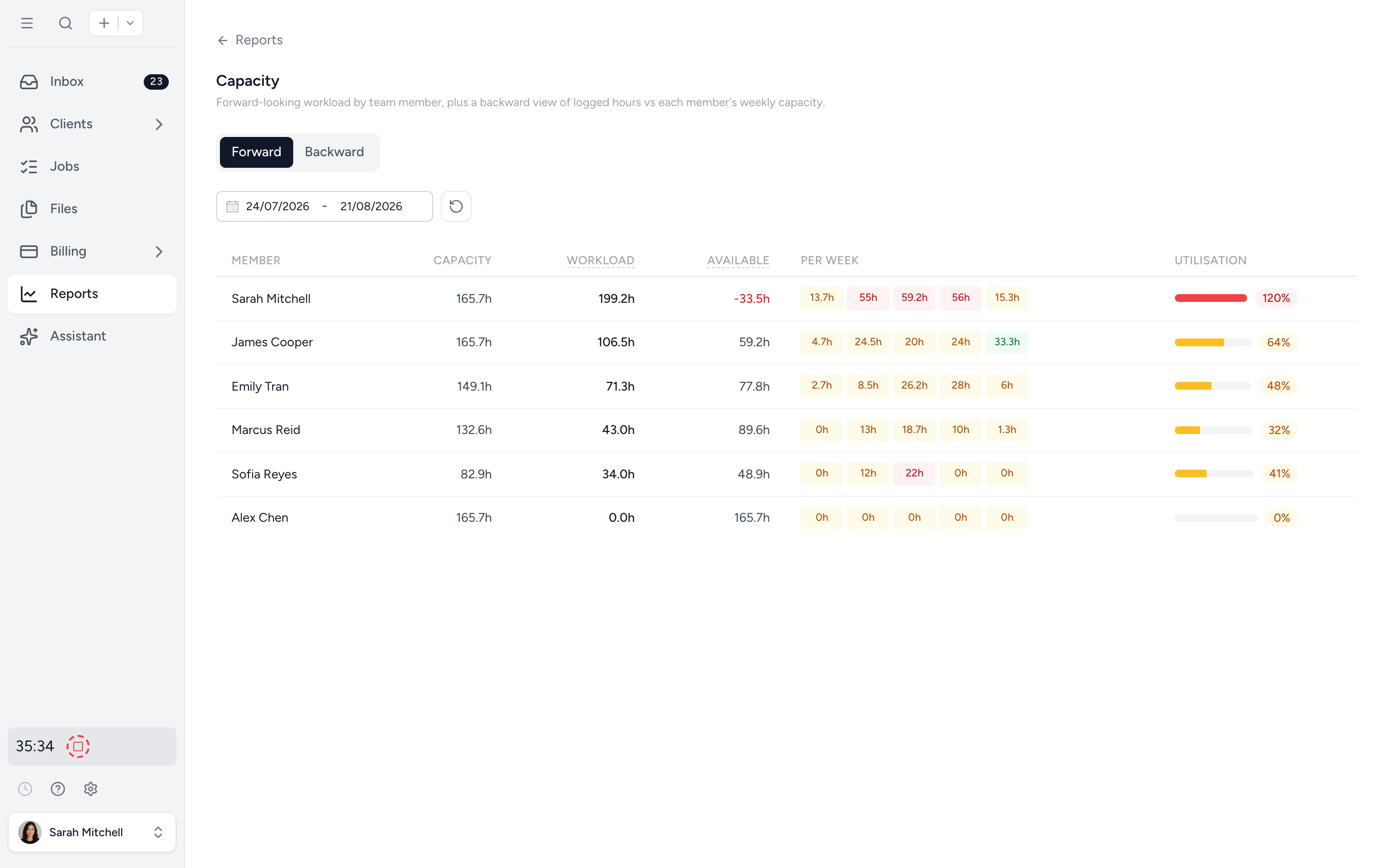
Tidyflow connects the client request to the assigned preparation and review work. Use recurring tax job templates with owners, internal deadlines and extended due dates. Outstanding request items show what the client still owes you. Pro adds service-specific statuses and capacity planning, so you can compare planned work with the capacity of the people reviewing it.
For a partnership and its owners, set up the relevant jobs, assign who is responsible and record the handoffs. Ready-made organizers help collect the entity and individual information, with reminders for missing or deferred documents. Your team performs the tax calculations and K-1 transfers in Lacerte or UltraTax; Tidyflow keeps the surrounding work visible.
At delivery, connect the engagement and fee to billing. Pro document approvals let clients approve the uploaded draft or request changes. With online payments connected, a linked invoice can require payment before document access, giving the team a defined route from completed work to collection.
Both vendors offer surrounding workflow products. Compare the complete process and cost, including what you already own. Tidyflow does not automatically share tax data with either engine, calculate returns or e-file, and it does not provide KBA for tax authorizations.
Trial it with one client group and the staff who prepare and review it. Record the next steps and expected effort, then inspect the work and capacity views together. Judge whether a reviewer can identify the next job and its outstanding items without asking for a status meeting. Compare the plans; this capacity and approval workflow requires Pro.
Try Tidyflow
Give the review team a clearer view of the work.
Start with one client group, assigned jobs and a review handoff. The free 14-day trial includes Pro features.
When to stay, when to switch
Stay with Lacerte if your required coverage is present, reviewers know the system and the UltraTax trial does not remove enough recurring work to repay migration. A new interface alone is a weak reason to rebuild complex clients.
Shortlist UltraTax if connected entities and state work create repeated manual steps, and the client-group trial shows that its data-sharing and allocation tools reduce those steps with a clear review trail. Include the surrounding products and access environment in that decision.
Consider a different comparison if the primary goal is preparation entirely in a browser. Read Lacerte vs ProConnect rather than expecting hosted desktop software to resolve every browser requirement. For lower-cost desktop options, use the US tax software guide.