
A portal clients actually use.
Send a request, set a reminder cadence, walk away. Clients upload via a secure link with no login required. Files land in the right folder. Tidyflow chases them when they don't.
Stop chasing for documents
Send a request, set the reminder cadence, walk away. Tidyflow nudges the client until the file lands.
Send a link, not an email
No-login upload links mean clients drop files in seconds. No password reset. No abandoned signup.
Give clients self-serve access
Clients see their documents, sign engagement letters, pay invoices, and respond to requests in one branded portal.
Send a request. Tidyflow chases for you.
Inside the job, build a structured checklist of files to upload and questions to answer, then send it to the client. Tidyflow handles the reminders automatically.
- ✓ Structured checklist items: files to upload or questions to answer
- ✓ Automated email reminders on outstanding items
- ✓ Status tracking on every request
- ✓ Files land in the right job, not a shared inbox
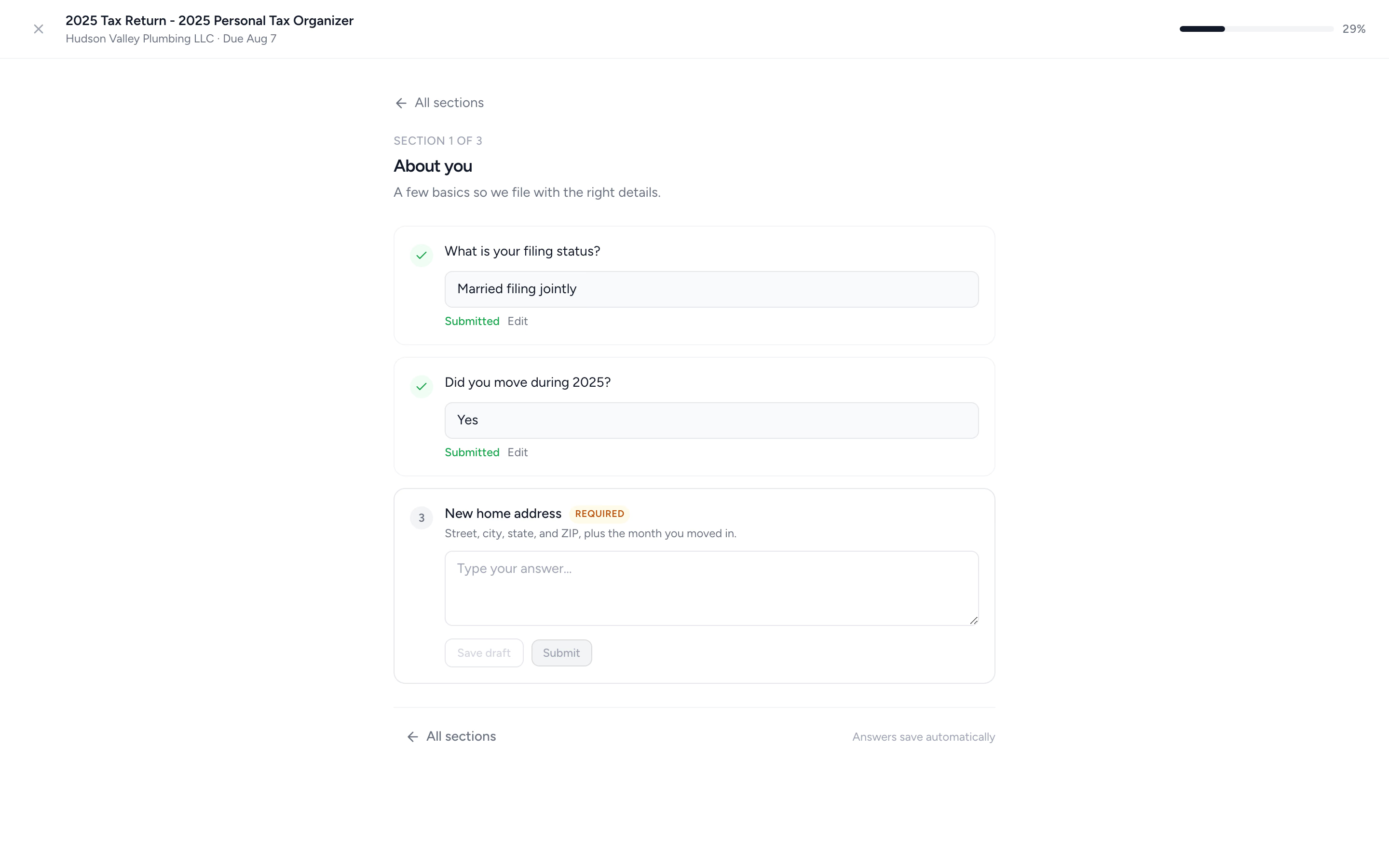
A full tax organizer, not a PDF questionnaire.
Build request forms with sections and conditional questions, so clients only see what applies to them. Answers save as they go, and last year's answers are one tap away.
- ✓ Multiple choice, date, and number answers, with show/hide logic between questions
- ✓ Last year's answer shown next to each question for one-tap reuse
- ✓ Review & submit with a typed sign-off, then PDF export
- ✓ Ready-made 1040 organizer template included
Sign-off that doesn't live in an email thread.
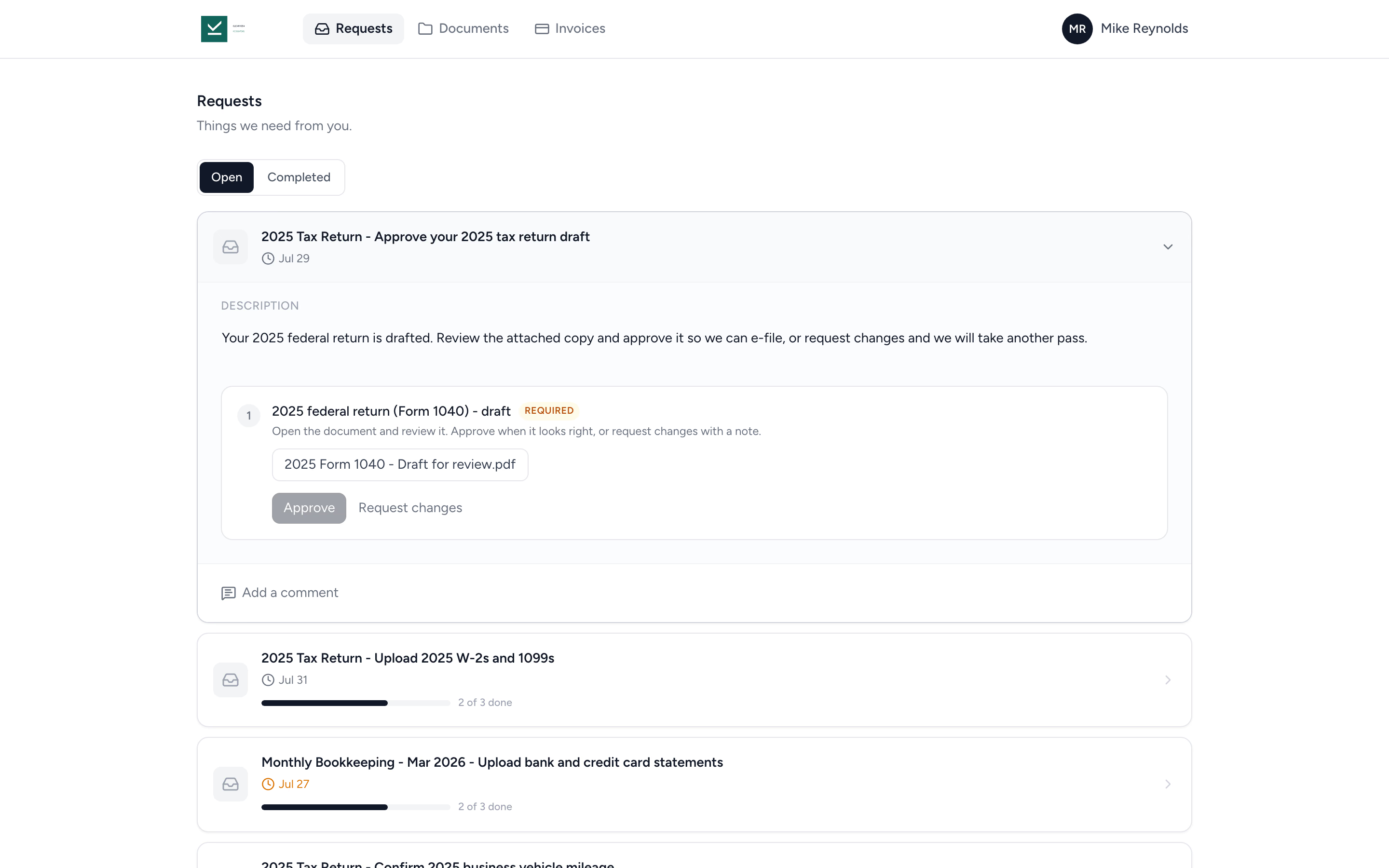
Attach a draft return or financial statement to a request and ask the client to approve it. They review the document in the portal, then approve it or request changes with a comment.
- ✓ Approve or request changes, with the client's comment on the request
- ✓ Clients open the document before they can approve it
- ✓ Optionally lock the document behind an invoice, released when the client pays
- ✓ Who approved, and when, recorded on the file
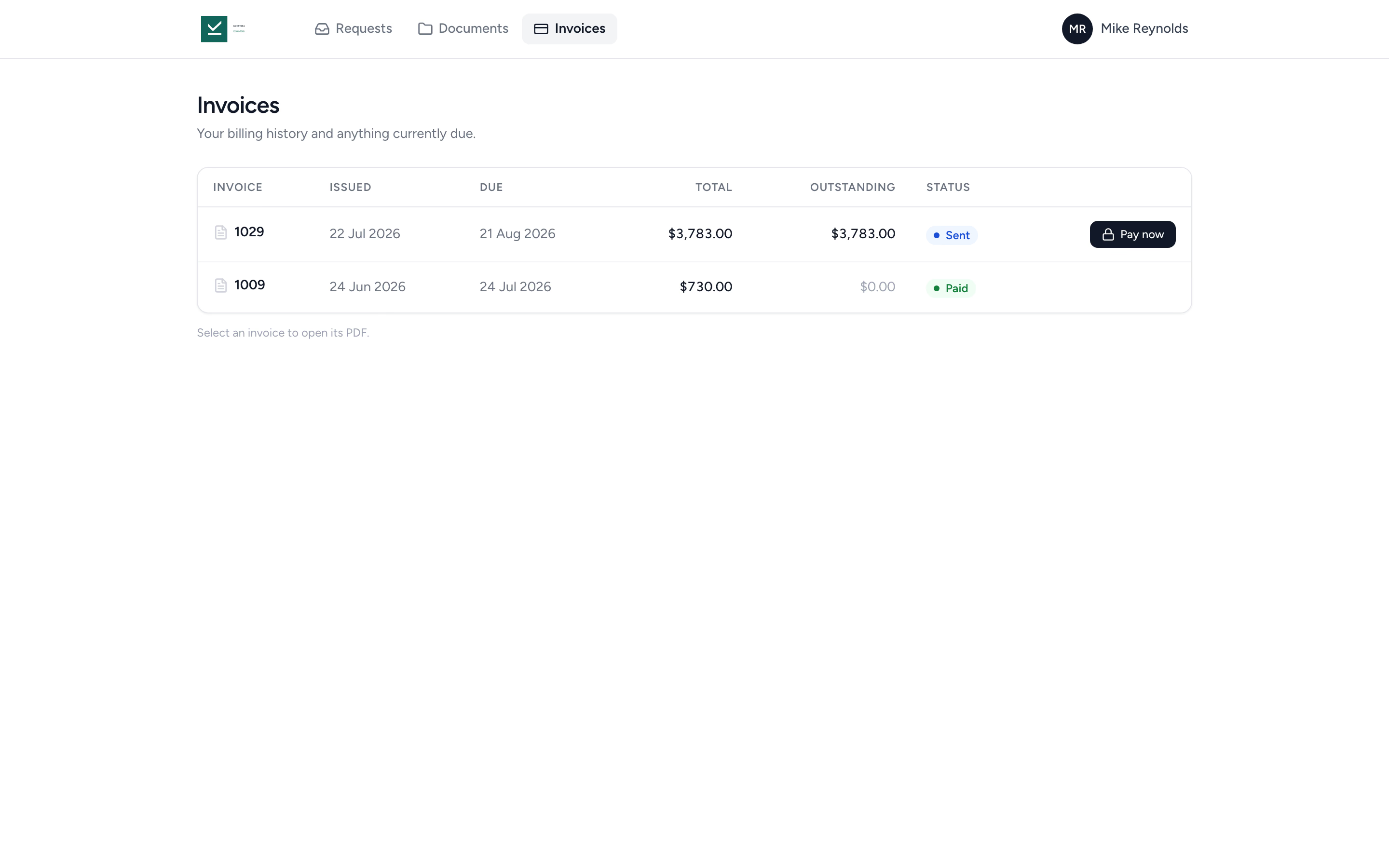
Invoices live where your clients already are.
Clients with billing access see their invoices in the portal, with what's outstanding and a Pay now button on anything due. One login for requests, documents, and billing.
- ✓ Pay now by card or ACH bank transfer
- ✓ Billing history with totals and outstanding amounts
- ✓ Saved payment methods managed in the same place
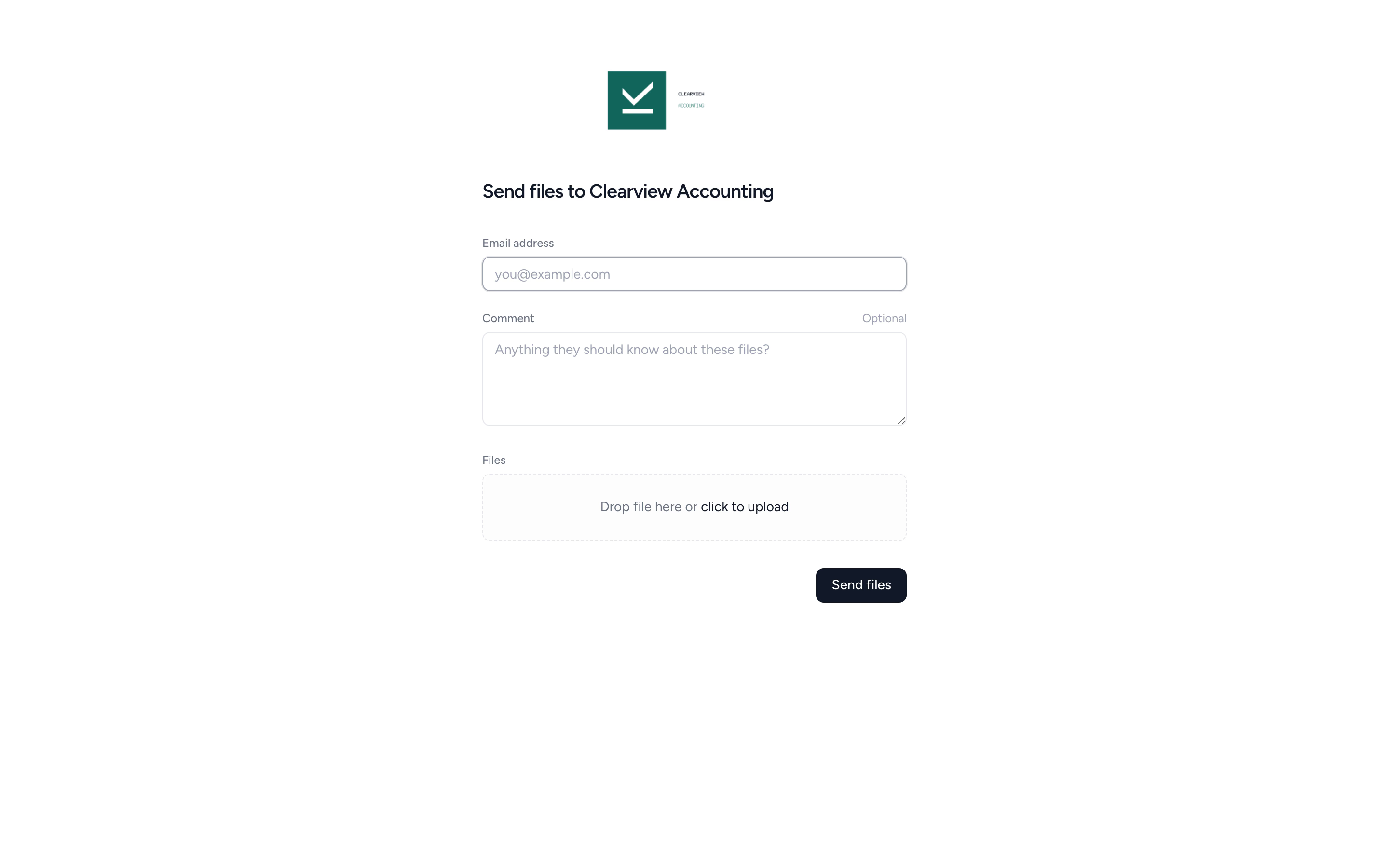
Your client doesn't need an account.
Send a secure upload link, your client drops files in, done. No password, no portal tour, no abandoned signup.
- ✓ A firm-wide link for ad-hoc uploads, or a per-client link that routes to the right folder
- ✓ Drag-and-drop with optional comment
- ✓ Audit-trailed: who uploaded, when, from where
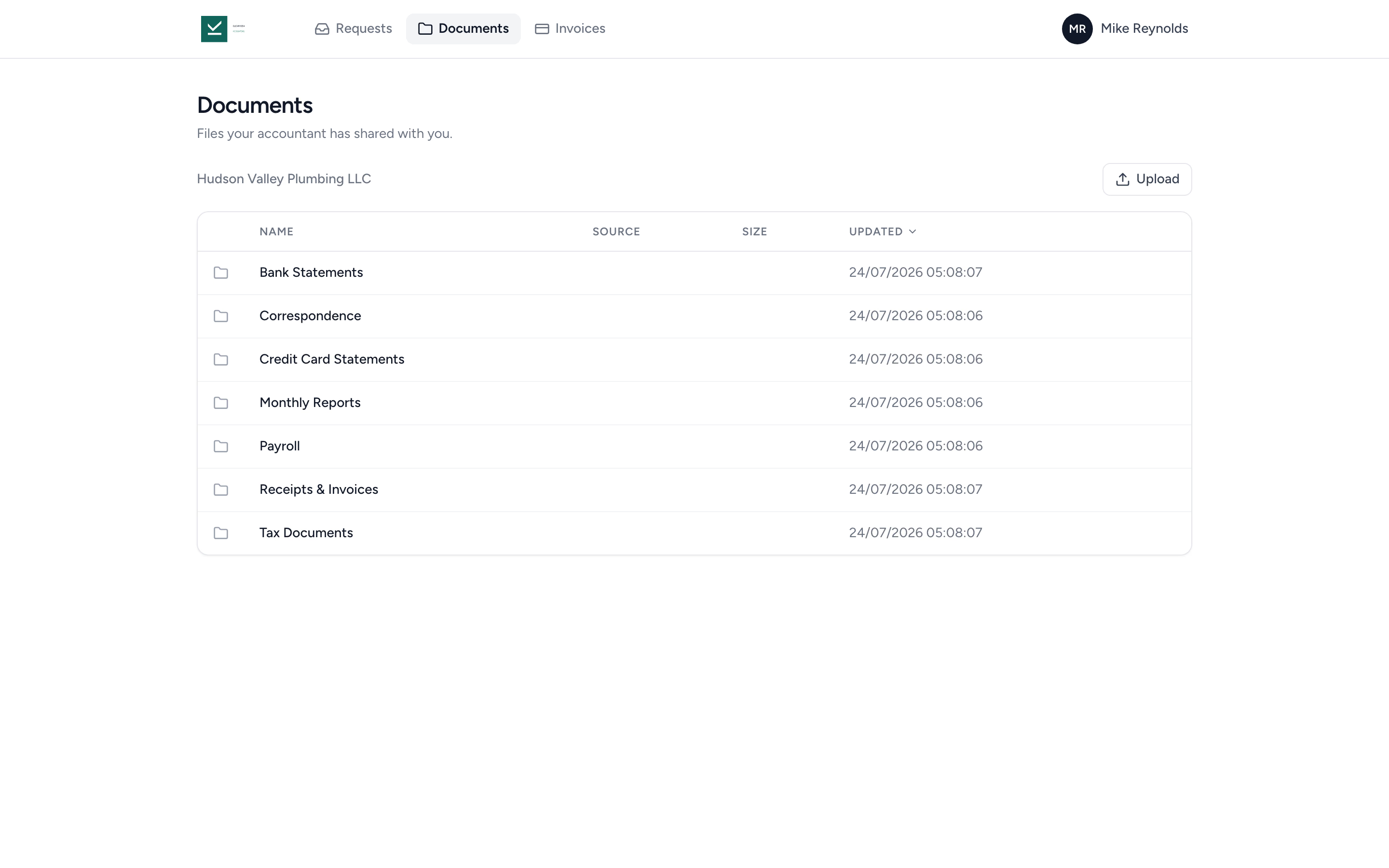
Clients access their documents in one branded place.
Clients see the folders you've shared with them, sign engagement letters, respond to requests, and download what they need. No more "can you resend last year's statements?" emails.
- ✓ Per-folder client access
- ✓ Multiple contacts, one login each
- ✓ Audit trail on every download
From "we still need the receipts" to filed in four steps.
- 1
Send the request
Choose what you need, pick the reminder cadence, hit send.
- 2
Client uploads
Drag and drop into the secure link. No login.
- 3
Auto-route & auto-close
Files land in the right folder. Request closes when complete.
- 4
Tidyflow nudges
Outstanding items get reminders on your cadence until they're done.
A two-minute guide to the portal, made for your clients.
Signing in, working through a request, uploading documents, and finding what you have shared. It uses an example firm throughout, so it is safe to send to any client.
Prefer to send a page they can read? Using the client portal.
What changes when chasing clients is automatic.
Without Tidyflow
- ×"Hi, just following up on the receipts" emails
- ×Clients ghost the portal because they forgot the password
- ×Files attached to email, scattered across mailboxes
- ×Manual status tracking in a spreadsheet
With Tidyflow
- ✓Automated reminders on the cadence you choose
- ✓No-login upload links, drag-drop, done
- ✓Files auto-route to the right job and folder
- ✓Live request status, no spreadsheet to maintain
Trusted by accounting firms tired of chasing clients.
10,000+ clients managed on Tidyflow today.
"The user-friendly interface and solid features have become essential in streamlining our accounting firm's operations, ensuring consistent and reliable service delivery."
 Andre CoutinhoAccounting Manager
 "Great for team collaboration, accountability, keeping track of information and ensuring nothing falls through the cracks."
 Kristine IsmaelPartner

Built for the way clients actually engage with their accountant.
Request
- Document & info requests
- Structured checklists (files & questions)
- Tax organizers with conditional questions
- Prior-year answers carried forward
- Document approvals with recorded sign-off
- Automated reminders
- Status tracking
Receive
- Firm-wide upload link
- Per-client upload links
- Per-folder portal access
- Drag-and-drop with comments
- Review & submit with typed sign-off
- Invoices with online payment
Govern
- Branded portal
- Multi-contact per client
- Firm resources tab
- Preview the portal as a client
- Audit trail on every action
- Encrypted storage and backups
Unlimited contacts on the portal. From $29/user/month, billed annually.
No portal seat fees. No per-contact fees. Bring every client and contact you have.
Portal and request questions firms ask us most.
Yes. On Pro, clients can open and approve an attached draft or request changes, then sign a supplied PDF through a signature item. You can link an invoice to an approval to require payment before document access, approval or signing. Enabling the payment requirement needs connected online payments. Approval and signature remain separate recorded steps.
Contacts access the portal via portal.tidyflow.com. They get a single login that works across every client they're linked to.
Yes. Multiple contacts can be linked to a single client, so different individuals at the same business can access the right files and respond to the right requests.
Yes. Every contact gets their own portal login, so a married couple filing jointly, two business partners, or a client and their bookkeeper never have to share a password. Add both to the same request and they work on one shared copy rather than getting one each: either person can answer a question or upload a document, and each sees what the other has already done. One job, one set of answers on your side.
Yes. Contacts don't have to wait for a request. They can sign in and upload straight away, which is what usually happens when a notice arrives in the post that nobody was expecting. The file lands in a Client Uploads folder on that client, so client submissions never land in the middle of your own working papers.
Yes, as long as you follow the client. Following a client tells Tidyflow to notify you whenever one of that client's contacts uploads a file, whether it came through a request, a shared folder, or the client's upload link. The notification names the person, the file, and the client, so you never have to open folders to check whether anything arrived. Files your own team uploads don't trigger notifications.
Yes. Each client gets a secure upload link. Clients drag and drop files, add their email, and submit. No account required, files land directly in the right client folder.
Tidyflow sends automatic email reminders for outstanding client requests on the cadence you set. Clients get a polite nudge so you don't have to.
Tidyflow is hosted on AWS and DigitalOcean infrastructure in U.S. data centres. Both providers are independently audited and maintain SOC 2 reports. Tidyflow adds encrypted backups, multi-factor authentication, and role-based permissions on top. Read the security page for the full detail.
Yes. Add your logo and use a branded login URL so clients see your firm, not Tidyflow.
Yes. Request forms support sections, conditional show/hide questions, and multiple choice, date, and number answers. Clients see last year's answer next to each question for one-tap reuse, review everything, and sign off before submitting. Ready-made organizers cover 1040, 1120-S, 1065, 1120 and 1041, and completed organizers export to PDF. Editing conditional questions requires Pro. More on tax organizers →
Yes. Contacts with billing access see their invoices in the portal, with outstanding amounts and a Pay now button. Clients pay by card or ACH bank transfer when online payments are enabled.
Stop chasing. Start receiving.
Start free for 14 days. No credit card. Send your first client request in minutes.
Explore more features
Workflow management
Recurring jobs, templates, and deadlines your team can't miss.
Client management
Every client, contact, and detail in one organized place.
Proposals & Engagement Letters
Branded proposals and engagement letters, signed online.
Billing & Payments
Invoice from tracked time or fixed fees, and get paid online.
Time tracking
Timers and timesheets that flow straight into billing.
Document management
Secure, organized document storage, shared with your clients.
Tax organizers
Digital organizers with conditional questions and last year's answers.
Email Management
A shared firm inbox, connected to your clients and jobs.
Artificial Intelligence
An assistant, agent teammates, and MCP connectors on your firm's live data.
Reporting & Insights
See where your time, billing, and revenue actually go.
Capacity Planning
See your team's workload before it hits.
Integrations
Xero, QuickBooks Online, Zapier, Make, and a public API.
Electronic signatures
Legally binding e-signatures, included at no extra cost.
Collaboration
Comments, mentions, and shared visibility on every job.
See the full feature list →
Compare every capability across plans, side by side.