ProSeries is the stronger starting point for a solo preparer who likes forms-based entry and has a predictable individual-return workload. ProConnect is the stronger starting point when preparing in a browser and connecting QuickBooks Online to tax are priorities. Neither conclusion carries over automatically to a multi-user firm preparing many business returns.
The main pricing trap is comparing bundle names. ProSeries Essentials 200 includes a pool of supported individual and business returns. ProConnect’s advertised individual-return bundles charge separately for business returns. Start with last season’s return count by type.
ProSeries vs ProConnect at a glance
| Decision | ProSeries | ProConnect |
|---|---|---|
| Daily preparation | Forms-based Windows application | Input-based browser application |
| Solo individual practice | Basic packages with return and state limits | Individual-return bundles or per-return pricing |
| Mixed individual/business practice | Professional packages, including mixed-return pools | Price business returns separately from individual bundles |
| Simultaneous staff access | Network licensing where required; Basic is single-user | Standard and paid Advanced user roles |
| Remote work | Optional hosted desktop | Browser access |
| Bookkeeping workflow to demonstrate | Your existing desktop import and review process | QBO trial balance, mapping and tax export |
| Specialist coverage example | Form 706 is listed | Form 706 is not listed |
Sources: Intuit’s product comparison and the package documentation below. We checked public sources on September 10, 2026. Recommendations are editorial assessments, not hands-on performance results. Tidyflow publishes this comparison and provides the client and job workflow around tax preparation.
Software price is only part of the cost per return. Chasing a missing W-2 or an unpaid invoice also uses staff time. See how Tidyflow connects client intake, the job and billing.
First choose the right ProSeries edition
“ProSeries costs…” is incomplete without the edition. Basic is designed around individual returns; Professional brings the broader return mix and team options.
| Package | Displayed purchase price | Included workload | Access distinction |
|---|---|---|---|
| Basic 20 | $729 | 20 individual returns; one state edition | Single user |
| Basic 50 | $1,099 | 50 federal individual and 50 individual state returns; two state editions | Single user |
| Professional pay-per-return | $539 plus return fees | Pay for the returns you use | Include any required network license |
| Professional 1040 Essentials | $2,605 | Unlimited individual returns and states; business returns extra | Include any required network license |
| Professional Essentials 200 | $3,641 | 200 mixed supported individual/business returns; unlimited states | One user included; Network License extra for simultaneous access |
Prices are USD offers displayed at the research date, excluding tax, hosting and add-ons. Sources: ProSeries pricing, Basic package selector and Essentials details. Offers can change; do not use the discounted purchase price as an assumed renewal commitment.
Two state editions is not unlimited state returns. A Basic 50 firm with clients who each file in several states could exhaust the included state-return count even while staying below 50 federal returns. Count both the state editions needed and the number of state returns.
A firm preparing corporations or partnerships also needs to evaluate Professional rather than treating a Basic quote as the complete cost. The lowest entry price is useful only if the package fits the work.
A concrete example: 50 individual returns
Assume one preparer completes 50 federal individual returns and 50 state returns across two states. There are no business returns, no optional services and no second simultaneous user.
| Configuration | Example software cost |
|---|---|
| ProSeries Basic 50, local desktop | $1,099 |
| ProConnect Essentials 50 | $2,478 |
| Difference | $1,379 |
The ProConnect package includes 50 individual returns and one paid user. Its price is not directly comparable if you add business returns or need different user entitlements.
At an illustrative $60 staff cost per hour, the $1,379 difference represents about 23 hours, or 28 minutes per return. ProConnect would need to recover that value through less preparation work, easier remote access or another operational benefit for this particular comparison to break even.
Now change the remote-access requirement. The Basic selector lists optional hosting at $80 per month. If purchased for twelve months, that adds $960, bringing the example desktop configuration to $2,059. The remaining difference is $419, equivalent to about 8.4 minutes per return at the same hourly cost. This assumes twelve monthly charges without a promotional reduction or other fees; use the actual hosting agreement in a buying decision.
That is why a blanket “ProSeries is cheaper” verdict is not useful. The conclusion changes with the access model, before either product prepares a return.
A different example: 150 individual and 50 business returns
Here the key issue is what a return credit buys.
ProSeries Essentials 200 can cover that 200-return mixed workload, subject to supported return types. ProConnect Plus advertises 200 individual returns, so the same firm must add the 50 business returns to its quote. Do not divide each bundle’s price by 200 and treat the resulting rates as interchangeable.
User counts also differ. ProSeries Essentials describes multi-user capability, but simultaneous access requires a separately purchased Network License. A second workstation or a hosted login does not remove that requirement. ProConnect Plus includes two paid users; the return mix and staff permissions still determine whether that is the right bundle.
For this practice, put three numbers beside each quote: the total for the mixed workload, the total for simultaneous staff access, and the cost of exceeding the plan. That makes an overage rate visible before the firm adds another batch of business clients.
The everyday trade-off: forms versus input screens
ProSeries allows preparers to work from familiar forms, use QuickZoom to reach supporting detail and navigate clients through HomeBase. Its Professional feature description is a useful starting point for a preparer who currently reasons from a line on the return back to the worksheet.
ProConnect uses input screens and produces the return from those entries. Moving from ProSeries therefore changes the working method as well as the location of the software. A browser login may be easy to learn; a new route to the input behind a complicated number takes practice.
For review, give someone a completed sample return with one deliberate, harmless input change. Have them identify the affected output and trace it to the source. Record the time and any help they need. Repeat with a return containing several K-1s or state adjustments. That tells you more about the fit than the number of features on a comparison page.
QuickBooks integration: follow the figures
ProConnect has a documented connection from QBO’s trial balance through Prep for Taxes to tax preparation. Intuit explains the QBO-to-ProConnect workflow here.
Test it with a client whose books need year-end adjustments. Check account mappings, make the adjustment, then confirm which tax inputs change and what the reviewer must verify. Count the QBO clients that would actually use that path; a firm receiving spreadsheets from most clients will realize a different benefit.
For an established ProSeries/QuickBooks Desktop setup, reproduce the existing import process in the proposed environment. If hosting is involved, include the required QuickBooks license and hosting tier. Keeping the familiar bookkeeping application does not guarantee the complete remote setup is included in the base tax price.
Paid users, portals and signatures
ProConnect’s free Standard users can create, edit and view returns. Advanced paid access is required for actions including printing and e-filing, with some bundles including paid users. Map those responsibilities before pricing the team; do not assume every person entering data needs an extra paid license. See Intuit’s User Access rules.
Both products have Intuit Link and signing options. Intuit’s current lineup includes Intuit Sign with built-in identity-verification options, so “we need electronic signatures” does not settle this comparison. Demonstrate the actual document, signer and identity-verification process you use, then check its inclusion in the chosen package.
What will move from ProSeries to ProConnect?
Intuit’s conversion matrix lists 1040, 1065, 1120 and 1120-S for ProSeries. It does not list 1041 conversion from that source. The general exclusions include state information, Forms 990 and 709, and unobtainable calculated carryovers. See the ProConnect conversion guide.
A trust return can be supported in the destination product while still requiring manual setup during this particular migration. That is especially important for a firm with a large fiduciary book.
Before scheduling the change, convert a representative individual return and a pass-through entity. Reconcile opening depreciation and carryovers, list the state data that must be rebuilt, and assign someone to review the exceptions. Keep historical PDFs, acknowledgments and signed records accessible. Budget the rebuilding work across the whole client list rather than extrapolating from a clean demonstration file.
Protect the margin on each return
The price examples above put a value on staff time. Apply the same scrutiny to the work around preparation: assembling documents, writing another reminder, checking job status and following up on the fee.
Tidyflow gives you a repeatable process from the first organizer to the final invoice. A ready-made 1040 organizer is attached to the tax job. The client answers in sections, saves progress and uploads documents beside the questions. If something is still missing, reminders include the outstanding items instead of requiring your staff to reconstruct a chase list from email.
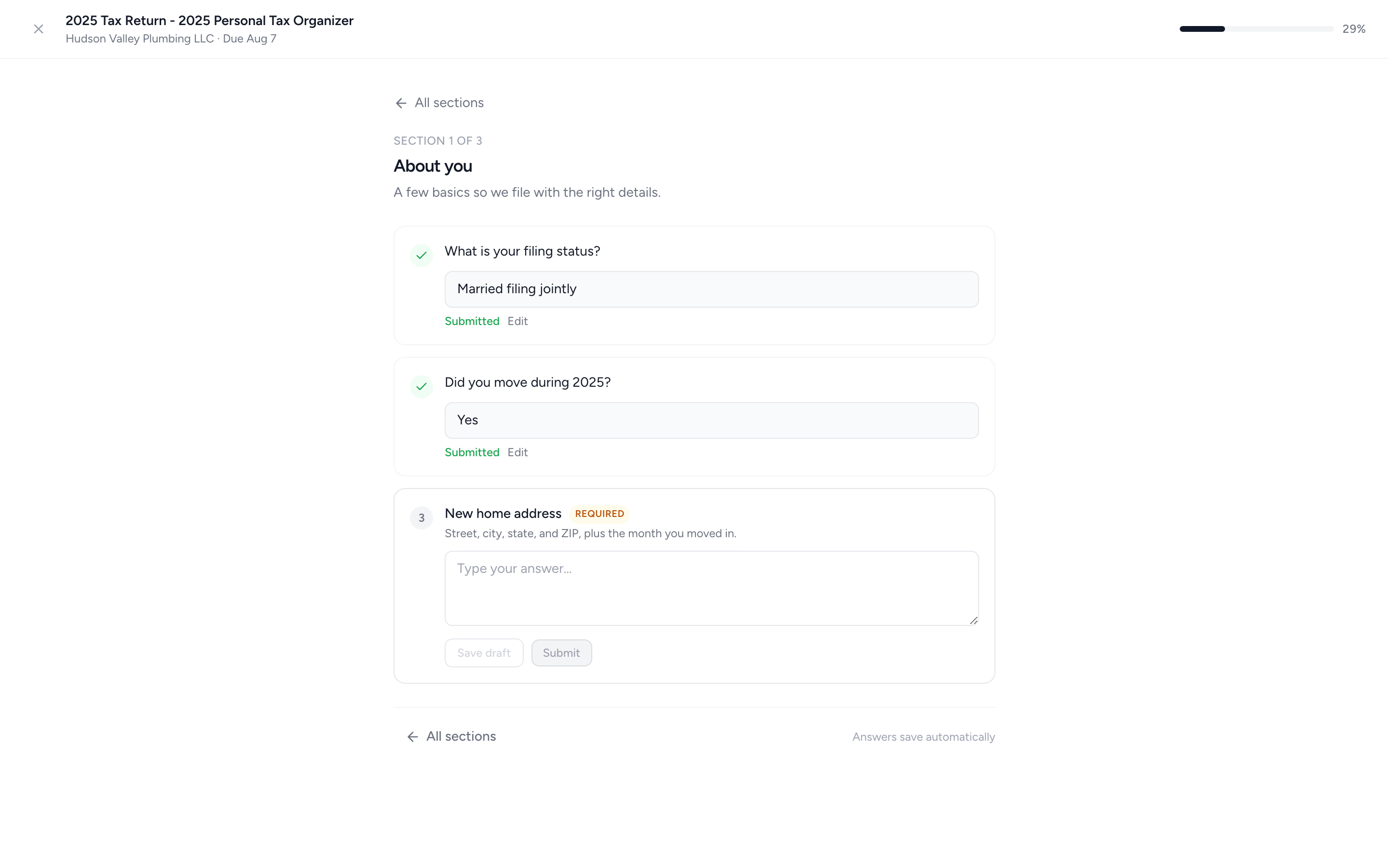
Job templates make ownership and deadlines explicit. Time tracking records the work that went into the return, while proposals and engagement letters establish scope and fees. For delivery, Pro adds document approvals and the option to require payment of a linked invoice before document access, with online payments configured.
That is useful whether the firm stays on ProSeries or selects ProConnect. The decision is whether a connected intake and billing process removes enough manual work to earn its place in your budget. Tidyflow’s pricing is per staff user; client portal users do not add paid seats.
Both Intuit products offer intake and signing tools; consider their existing place in your process. Tax preparation and e-filing stay in ProSeries or ProConnect, without automatic Tidyflow tax-data sync. Pro is required for configurable conditional questions and document approvals. Tidyflow does not provide KBA for tax authorizations.
Measure the difference with a small batch of clients. Start with the ready-made organizer and track the reminders your staff still have to write, time spent finding documents, and whether completed work reaches an invoice. Use those observations to assess value rather than assuming a time-saving percentage.
Try Tidyflow
Try a more repeatable process for your next return.
Use the ready-made organizer, assign the work and connect it to billing. Free for 14 days; no credit card required.
The decision for three common firms
Solo preparer, mostly individuals: price the right Basic package first. ProConnect’s convenience needs to justify the difference for your actual return and state counts.
Remote QBO-focused practice: demonstrate the complete books-to-tax workflow in ProConnect and compare it with the annual cost of hosting ProSeries. Include reviewer retraining in year one.
Growing mixed-return team: compare Professional against a ProConnect quote with every business return and paid role included. A 200-return label alone will not tell you which costs less.
Need broader specialist coverage? Read Lacerte vs ProConnect. Looking beyond Intuit? Start with the US tax software shortlist.